A lot of people wonder what tweaks to install after they Jailbreak their iPhone, iPod Touch or iPad. I know quite a few people who have Jailbroken devices and a lot of them have maybe 1 or 2 tweaks installed, and it is because they just don’t know what to install. I have finally come close to perfecting the setup on my Jailbroken iPhone 5 for the time being, and as such I thought I would share my particular setup to give you some inspiration what Cydia tweaks to try on your device. Down the road I will also make a similar post to this one for the iPad.
The Lockscreen
The Lockscreen of my iPhone 5 is the only area that I am not 100% satisfied yet, and I have a feeling I will be changing it up shortly. Regardless, I am happy with how the lockscreen looks, which was accomplished with a WinterBoard theme, it’s just notifications aren’t displayed with a Lockscreen WinterBoard theme and this sometimes becomes an annoyance.
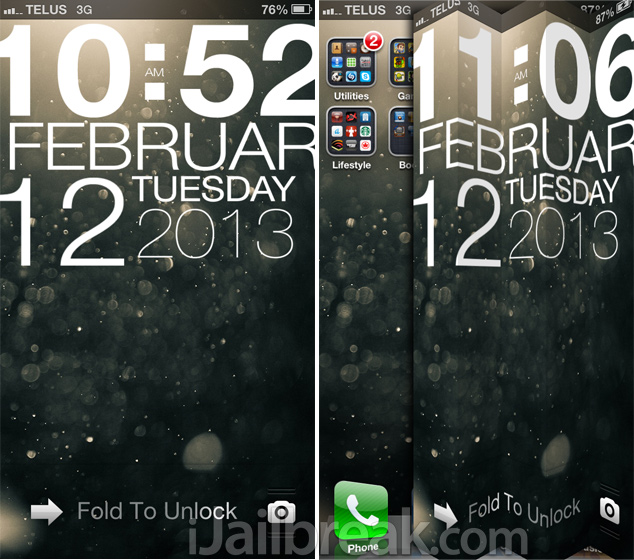
The tweaks I used to accomplish the Lockscreen are as follows:
- Unfold
- WinterBoard (Typophone 4, User Lock Background)
- Clock Hide (to hide the Lockscreen clock for the Typophone theme)
The Homescreen:
The Homescreen is the most heavily modified area of my iPhone 5. I have used the power of Springtomize 2 to shrink icons and give it that nice coverflow effect on the dock. I have Infinidock installed to make my dock scrollable as well, and of course I utilized a wide variety of Dashboard X widgets. I also have Barrel installed for page flipping animations.
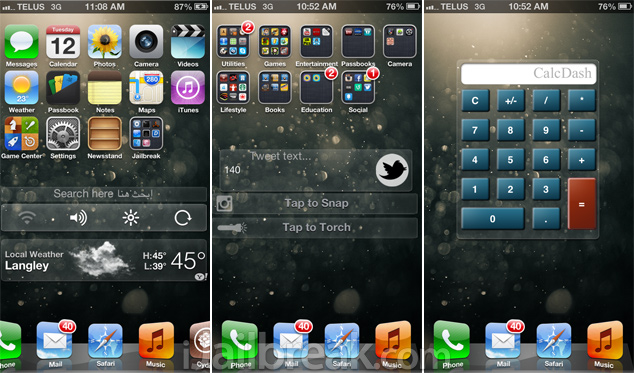
The tweaks I used to accomplish the Homescreen are as follows:
- Springtomize 2
- Dashboard X
- Infinidock
- Barrel
The Dashboard X widgets I used are as follows:
- Weather Widget
- Google Dash
- NCSettings
- Dashtweet
- InstaSnap
- TorchNC
- DashCalc
The Notification Center
The notification center on my iPhone 5 utilizes a tweak from Ryan Petrich called FastBlurredNotificationCenter to give it that nice background. The only 3rd party widgets I have enabled in the Notification center are a Cydia search widget and toggles from NCSettings.
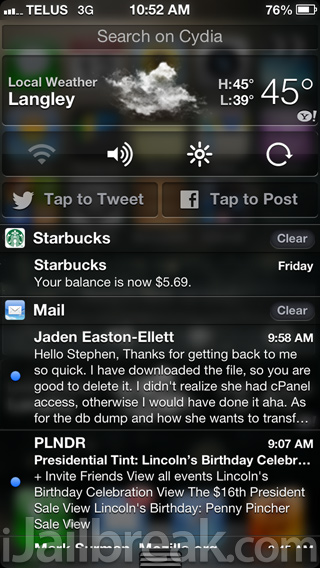
The tweaks I used to accomplish the Notification Center are as follows:
- FastBlurredNotificationCenter
- Cydia SearchNC
- NCSettings
Other Areas
The only other areas of my iPhone 5 I have tweaked is the multitasking switcher and the ability to get Cydia push notifications. Right now I have it set so if you double tap the status bar, my iPhone will automatically check for Cydia updates without me having to actually launch Cydia. I have also utilized the popular auxo Cydia tweak to dramatically increase the functionality of my multitasking switcher.
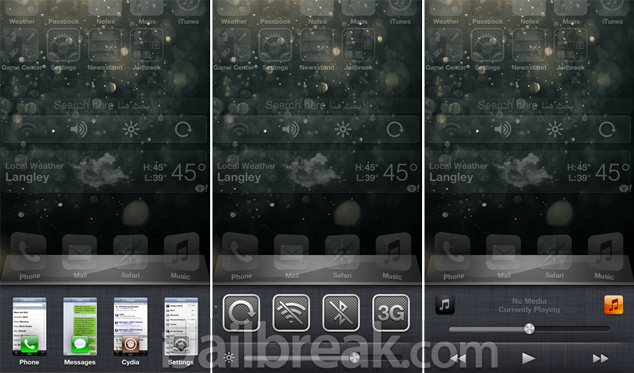
The tweaks I used to accomplish this are:
- Activator
- Curiosa (for the Cydia updates)
- Auxo
…
All-in-all I am pretty happy with my current iPhone 5 setup. There is definitely room for improvement in areas such as multitasking, Siri and other stock app tweaks, but I will get to that as time goes on. As for the price of this setup here is a quick calculation:
- Auxo – $1.99
- Barrel – $2.99
- Springtomize 2 – $2.99
- Dashboard X – $1.99
- Infinidock – $0.99
- Total: $10.95
The rest of the Cydia tweaks are free and can be found in community repos. The only two tweaks that can’t be found in community repos are FastBlurredNotificationCenter and Curiosa. You will have to add Ryan Petrich’s repo which is http://rpetri.ch/repo. Let me know what you think of this setup and if you have any suggestions.
P.S. You can find the wallpaper I used for my iPhone 5 and many others here.
Nice setup! ;)
Awesome Setup Jaden!!!
That’s a dope setup!
I really love the tweak scrollingboard on my iPad, but can’t make it work properly..
Awesome! Waste of battery life!
Hardly. I’ve had plenty more tweaks on 5.1.1 then him and my battery life did well.
For your 5 columns, did you use an app to set the 5 rows or use springtomize? I cannot seem to get 5.
You can use Five icon dock.
I see we have similar taste in tweaks!
Does anyone know any dreamboard themes for iPhone 5?
generally all themes that do not come with a wallpaper with them will work on the iphone 5 – for they are working on the 4S and the screen layout (resolution and stuff) is very similiar.
Dock Coverflow tweat.?!
Nice, seems sleek. But your springboard widgets is what I dislike. My setup for springboard is Parrallax, gaskart theme (winterboard), more icon, shrink and infinidock.
I used Springtomize. You go into the Icons settings and set icons per line to 5, I also have Additional row enabled and I resized my icons to 90%.
It’s unfortunate that I like having a passcode because Unfold is beautiful when you don’t have one.
Htc lock screen is a nice feature, just get he hd one
I cannot seem to get the change user background to go away on the typo tweak. It tells me to go into setting set the back ground and respring. i did that. still says to do it. Any suggestions? (4S 6.1)
How did you change the background on typophone 4?? I can’t get mine to change
Let’s see : what do I have running on my iPhone 5 (just stating the one that “show” up somewhere so I’m leaving out things like AppSync and afc2add eg) :
Activator
AppCent
Auxo
Barrel
Battery Colors
Bytafont (with the superb Boxii font)
Cleverpin
Color Keyboard
Dashboard X
Double At (doesn’t show up but it’s a small genius tweak)
FullForce for iPhone
Infinidock
iOS6 ColorfulStatusBar
Jukebox for NC
Landscape Lock Rotation
MultiIconMover
Orientation Activator
Springtomize22
Webscrollian (!!!)
Winterboard
Zeppelin (brilliant ;-) )
and finally %Hook’s Law…
Quite a list and my iPhone hasn’t budged at all and is still stable :-)
On my iPhone 4, Dashboard X corrupted Barrel (Barrel had cured the very annoying screen lag, which was the reason I jailbroke in the first place), and uninstalling it did not solve & revert back to the fluid IOS experience of before.
I therefore daren’t reinstall Dashboard X with Barrel again – has anyone else experienced this, or have any tips?
Anyone else using typophone 4 and not getting notifications on the lockscreen?
Good to see that youre are using mine tweak Cydia-SearchNC
Try not having “User Lock Background” ticked. Also if you have some kind of lock tweak, like I had Lockinfo, uninstall it. Try changing the wallpaper, then do a hard reset. Eventually you should get it to work.
Typophone 4 doesn’t seem optimized for the iPhone 5. February and the time and dates are cut off. Also, I have “Unlock” text over the unlock bar that isn’t shown in this dude’s screenshot. How do I get rid of it? It’s annoying.
Never mind. Find it. In Winterboard, select the “No UNLOCK” option.
what cydia tweak did you use to make five icons in a row?
what tweak to use when setting 5 icons in a row?
Which wallpaper are you using ? Can give a link please!