The Hands-Free Control Cydia tweak is one of those tweaks that I would recommend to anyone who has an iPhone 4S (or older iOS device with Spire installed) and wants to have the freedom of activating Siri without actually having to hold down their Home button. This means your iPhone 4S could currently, for example, be sleeping, and with a keyword of your choice, Siri will activate and be awaiting your every command.
As your iPhone 4S will be constantly listening for the activation keyword there is some noticeable effects on your battery life, but I wouldn’t say it is a dramatic effect. And to make matters better the Hands-Free Control Cydia tweak comes with settings to help you minimize the footprint on your battery life such as sensitivity and audio quality adjustments.
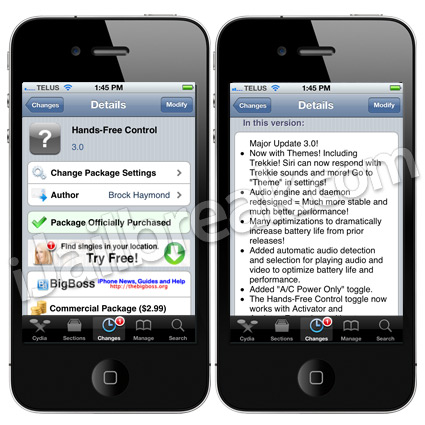
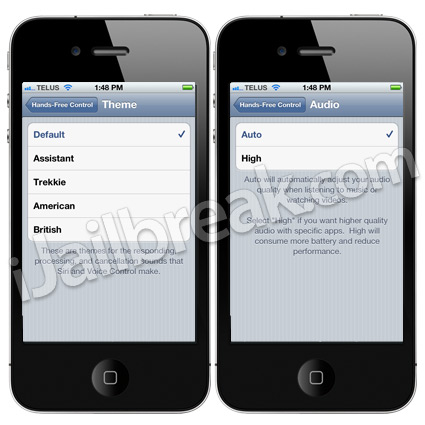
Today a brand new update for the Hands-Free Control Cydia tweak was brought to our attention. This update brings Hands-Free Control to version 3.0 and includes numerous improvements and new features. Probably one of the most note-worthy features in Hands-Free Control 3.0 is Siri sound themes. With these Siri sound themes you can change the voice of Siri to resemble a Trekkie, a British person (my personal favourite), an American person and even others!
Besides the addition of Siri sound themes there has been many core optimizations to greatly improve battery life and stability. In fact, the Hands-Free Control Cydia tweak now works with Activator, AssistantExtensions and even includes a SBSettings toggle to turn off the listening service at your convenience. There is even some bug fixes to do with bluetooth compatibility and other issues effecting system volume and vibration.
If you are interested in the Hands-Free Control 3.0 Cydia tweak you can find it through Cydia for a price of $2.99. Of course if you have already purchased the Hands-Free Control Cydia tweak you can simply refresh your sources and update to version 3.0. Don’t forget to let us know your thoughts on this update in the comments.
i tried the initial release. it kept making fake phone calls every 2 seconds in my cars bluetooth as it was constantly “listening” for me to activate Siri….had to uninstall. caused other issues as well.
I am still having issues with this software, even after the update. It causes the click sounds while typing a message to disappear which bothers me because it is like my haptic feedback that everything is working. Also it seems to randomly change my volume levels on occasion. Disabling the listening service immediately makes all these issues go away.
Like the concept. Can’t use in the car. When paired with my Bluetooth speaker phone, the speakerphone says “call ended” aloud everytime I close a window. Also, if I stream music over the stereo with voice command enabled the music sound quality is horrendous. As soon as I disable the active listening it sounds great.
Like I said, I like the concept but I’m disappointed I can’t yet use it where I really want to- in the car.
This has been addressed in 3.0. If you are using the built-in iPod the audio quality will automatically be adjusted for you. If you are using a 3rd party app you can set the audio quality to “High”.
Keyboard click sounds should be working now in 3.0. When have they not worked for you?
does this work for ipads cause i have it and it doesnt work any fixes?
I loved this tweak but had to uninstall it when I found that it messed up AirPlay by not showing any of my AirPlay devices. I tried uninstalling/re-installing, and determined that this tweak was definitely the culprit. I hope I can install it again once this is fixed.
On my ip4 with 501 installed it does not allow the phone to boot back up from a power off state. It hangs at the apple logo. its as if the redsnow untethered jailbreak has become tethered. I have a feeling its related to a launch daemon that it installs.
Im not out any money becuz i used the cracked version 3.0 from the xsellize repo. I always try the “free” ones first b4 i buy. I will gladly purchase this from bigboss when these issues are taken care.
Anyone else having this issue?
I’m out $2.99 because I always pay for apps. Maybe there’s some merit to the “try-before-you-buy” piracy policy :P
What’s happened to the Voice Response setting.. No longer able to have SIRI respond with “yes”