With a lot of people running the iOS 5 beta series firmware, I am sure downgrading back down to the official iOS 4.3.5 firmware has crossed your mind. If this sounds like you, you will be glad to know that the process of downgrading back to the iOS 4.3.5 firmware is extremely simple. It does not involve changing your hosts file or using the application TinyUmbrella and it doesn’t require you to have saved SHSH blobs. This is because the iOS 4.3.5 firmware is the latest official firmware available.
Note: The iOS 4.3.5 firmware can be Jailbroken but it is a tethered Jailbreak. Follow our step-by-step guides in our How To Jailbreak section.
You can follow the straightforward guide below for downgrading your iPhone, iPod Touch or iPad running the iOS 5 Beta 1, iOS 5 Beta 2, iOS 5 Beta 3, iOS 5 Beta 4, iOS 5 Beta 5, iOS 5 Beta 6 or iOS 5 Beta 7 firmware to the iOS 4.3.5 firmware.
Downgrading From iOS 5 Beta 1 – 7 To iOS 4.3.5
Step 1) – The first thing you are going to need to do is ensure you are running the latest development version of iTunes on your computer (which will be iTunes 10.5 beta 7). You can download iTunes 10.5 beta 7 for Windows and Mac OS X from the Apple Dev Center.
Step 2) – Once you have ensured you are running the latest version of iTunes on your computer you will need to make sure you have access to the iOS 4.3.5 firmware. If you need to download this firmware file you can go to the iJailbreak Downloads Section.
Step 3) – Now comes the hardest part; You must put your iPhone, iPod Touch or iPad into DFU mode. This is done by doing the following:
- Turn your iPhone, iPod Touch or iPad off.
- Hold the Power and Home Button for exactly 10 seconds.
- Once you Hold the Power and Home Button for 10 seconds release the Power Button and continue holding the Home Button for up to 30 seconds
If you enter DFU mode correctly iTunes will open telling you that that you must restore your iPhone, iPod Touch or iPad.
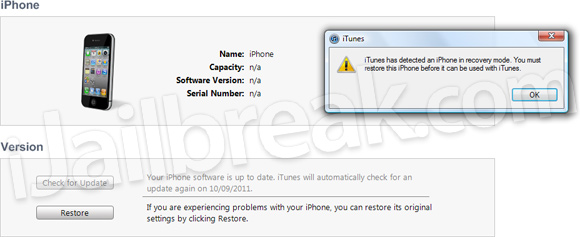
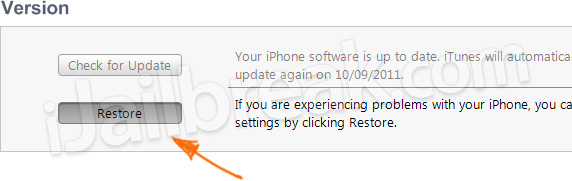
Step 4) – With iTunes open press Shift+Restore (Windows) or Option+Restore (Mac) and select the iOS 4.3.5 firmware file. Upon doing this your iPhone, iPod Touch or iPad will begin restoring itself to the iOS 4.3.5 firmware without any problems as the iOS 4.3.5 firmware is the latest official firmware.
For more downgrading guides visit our How To Downgrade section. Let us know if you had any problems in the comments section below…
will this work on ipad 2?
Yes this should work on all iDevices :)
will this downgrade the baseband as well ?
will this downgrade the baseband as well ?
i have the latest version of iTunes, and i downloaded 4.3.5 so i could get it on my iPod when i click opt-restore, but i keep getting error 21 or 1604. what do i do?
Will my iPhone show up in iTunes beta 7 after restoring to ios4?
and will I be able to restore from the backup that I did while still on iOS5 beta 7?
works a treat. :)
doesn’t work .. error 1604 .. every time
I can downgrade to iOS 4.2.1 (last version installed on my 3GS before the update to iOS5B7), but it just won’t go to 4.3.5.
yes it will, just tried it on mine!
Yes me too!
Doesn’t work this way.
i m also
did you used the saved shah to downgrade to 4.2.1? thanks
i did it as described, but itunes crashed while restoring 4.3.5
only way to get my 3gs working is installing latest itunes 10.4 and downgrading to 4.3.3, then using fixrecovery to get out of recovery loop after error 1015 …
any recommendations?
your iphone will show up in iTunes beta 7, but you can’t use the backup from iOS 5 because of the way iOS 5 backups work.
keep getting error 1
it didnt work!
Yes, for the downgrade to 4.2.1 I used saved ones, but for 4.3.5 I did not have, thought they were not neccesary.
lies dosent work for cdma
bla bla bla bla
just make you iphone in dfu mode and restore to 4.3.5
without any hopless programs
the apple still support 4.3.5
I am also trying to downgrade, and I get an error, and than my phone will just reboot and I still have iOS 5. Does iTunes have to be 10.5 beta 7 for this to work for sure
It works fine until the end of the restore, when it ‘verifies’ with Apple. Then it says I’ not authorized for 4.3.5, and quits! It won’t do it without being connected to the internet either! I have ITunes 10.5, and and Ipad 2 16G WiFi.
Can you please update this! thank you in advance
how to downgrade from ios 5 to 4.3.5
can you give us step by step procedures on how to downgrade ipad 2 from ios 5 to 4.3.5?
Now the Ios 5 is the latest official firmware (not 4.3.5), so you cannot downgrade it in that easy way. i will post the working way soon.
are you sure that apple still supporting ios 4.3.5????
Hello Mohamad , i have saved ios 4.1 shsh from my iphone 4 , can i downgrade it from ios 5? Can you give me a link to an tutorial?
will this downgrade the baseband as well ?
i done the following guides but then its says “the iphone couldnt be restored. An unknown error occurred(11).” so how to solve this problem?
Error 3194 This device is not eligible for the requested build above.
i done the following guides but then its says “the iphone couldnt be
restored. An unknown error occurred(11).” so how to solve this problem?
i done the following guides but then its says “the iphone couldnt be
restored. An unknown error occurred(11).” so how to solve this problem?
same problem here
bollocks it doesnt work …
IF YOU DONT HAVE A SOLUTION TO THIS WHY ARE YOU WASTING OUR TIME?
Hi there
i do have an i phone 4 with ios 5 which is a jail broken i phone
Is there any way to put it back i mean restore it with the original ios 5?
please help me
many thanks
It says it could not be restored (3194) help!!
YOU BROKE MY IPOD YOU F#@@##@@@@#@@^$^^^^$%$##@!##@@#@#@!####!@@$%%$@%$##^&$%%*#@#^$#$ A$@^&$#! YOU ARE A WASTE OF HUMAN LIFE!
My iTunes, as soon as the iPhone is on DFU mode, pops up a screen saying that the update server could not be contacted and telling me to check my internet connection… I tried it with my firewall off and still had the same problem. Does anyone know how to solve this? I have the latest version of the iTunes, but when i click “check for update” it pops up the same window saying it cannot reach the server… =/
no Apple A5 processors are not supported yet
If you dont have the Blobs saved, you cant… only ifaith will help if you are already on 4.3.5
The downgrade does not work anymore as 5.0.1 is finalized at this time… Apple is only signing 5.0.1 at the time and 5.1 next… if tinyumbrella doesnt have your SHSH saved… you CANNOT DOWNGRADE
I wish I had known that before I tried this! Now my phone is all messed up and I can’t downgrade or do anything. Why didn’t you delete this tutorial if it no longer works????
also i got problem error 3194
No wonder why) It’s because blimey apple isnt signing old ios anymore.
IT DOESN’T WORK!!! Apple is being a douche and isn’t allowing you
iOS 5 is a piece of shit. We need a fix for downgrading ASAP.
flippin’ 3194 error HELP
Hi, i hav iphone4 with ios5.0.1 and firmware 04.11.08 and i dont have saved sh,, chow can i downgrade firmware