Earlier today we told you that the iPhone Dev-Team released RedSn0w 0.9.10b1 to Jailbreak the iPhone, iPod Touch and iPad Untethered running the iOS 5.0.1 firmware. In this specific how to guide from iJailbreak.com you will learn how to Jailbreak the iPhone 4 or iPhone 3GS untethered running the iOS 5.0.1 firmware using RedSn0w 0.9.10b1 on Mac OS X.
Note #1: If you are already Jailbroken tethered on the iOS 5.0.1 firmware you may want to use the Corona 5.0.1 Untether Cydia package instead. More information is available here.
Note #2: This is not the iPhone 4S Untethered Jailbreak.
RedSn0w 0.9.10b1 Untethered Jailbreak
Step 1) – The first thing you will need to do is download RedSn0w 0.9.10b1 for the Mac OS X operating system using the download mirror below or through the iJailbreak Downloads Section.
Download RedSn0w 0.9.10b1 (Mac OS X)
Download RedSn0w 0.9.10b2 (Mac OS X)
Step 2) – Once you have downloaded RedSn0w you will need to launch it by double clicking on the redsn0w app.
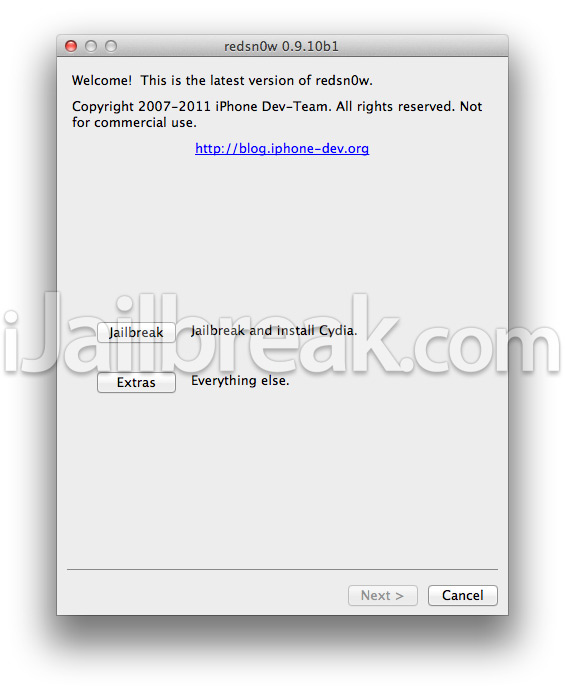
Step 3) – With RedSn0w running you will need to click the Jailbreak button.
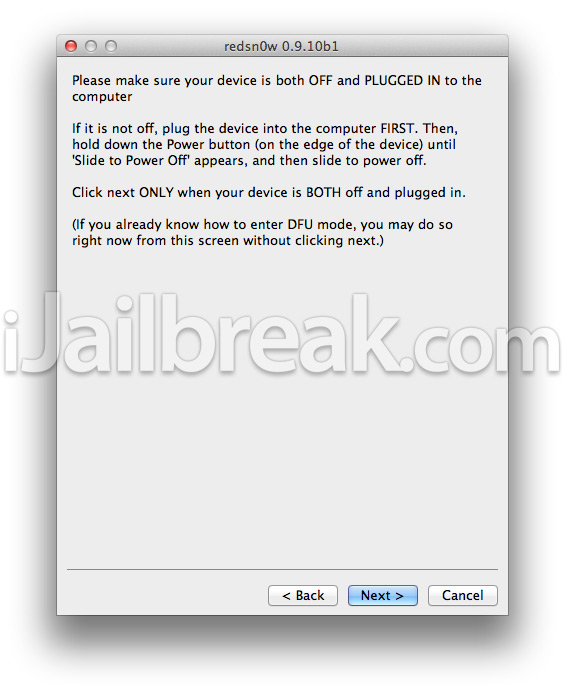
Step 4) – After clicking the Jailbreak button you will come to a screen where you will need to put your iPhone into DFU mode. Read through and follow the instructions presented to you which is to plug in and power off your iPhone and click then next button when you are ready to begin the DFU mode process.
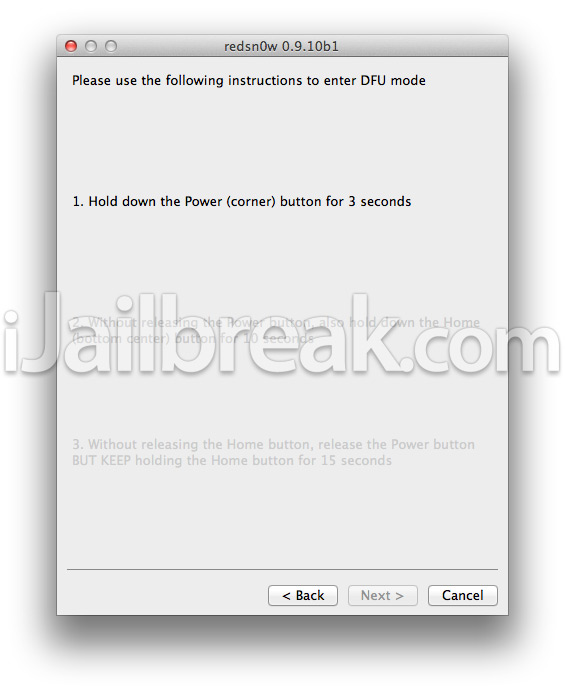
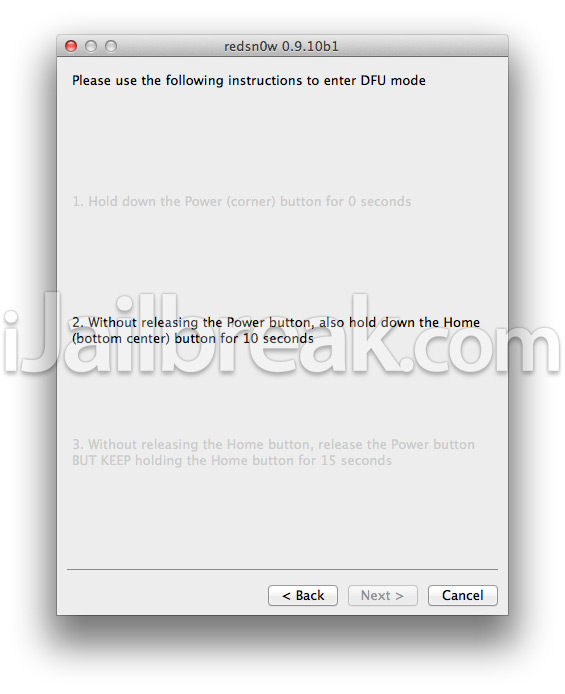
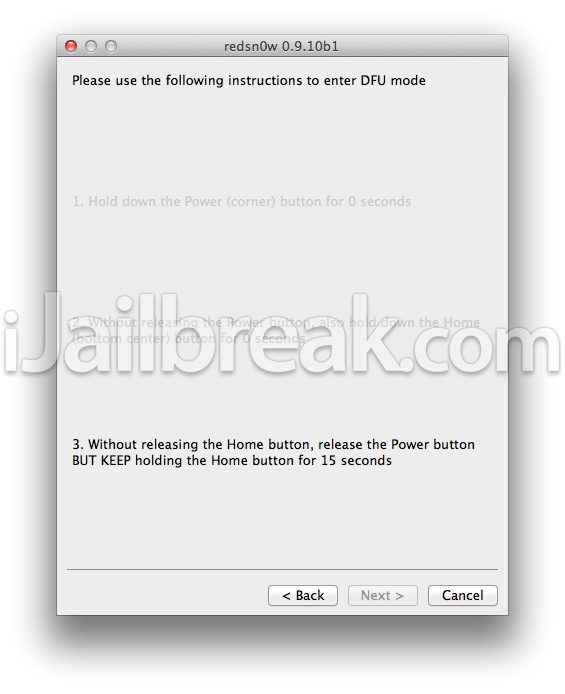
 Step 5) – When you click the next button you will need to follow the instructions presented to you in real-time to put your iPhone into DFU mode.
- Hold down Power (corner) button for 5 seconds.
- Without releasing the Power button, also hold down the Home (bottom center) button along with the Power button for 10 seconds.
- Without releasing the home button, stop holding down the power button for up to 15 seconds.
Step 6) – After you successfully enter DFU mode RedSn0w 0.9.10b1 will begin preparing your iPhone for the iOS 5.0.1 Untethered Jailbreak.

Step 7) – Once RedSn0w has finished preparing your iPhone for the iOS 5.0.1 Untethered Jailbreak you will be asked you to specify options to go along with your Jailbreak. If you are simply re-jailbreaking your iPhone that is running the iOS 5.0.1 firmware jailbroken tethered then you will want to uncheck the install Cydia option. On the flip side, if this is your first time Jailbreaking your iPhone running the iOS 5.0.1 firmware then you will want to make sure you have the install Cydia option checked.
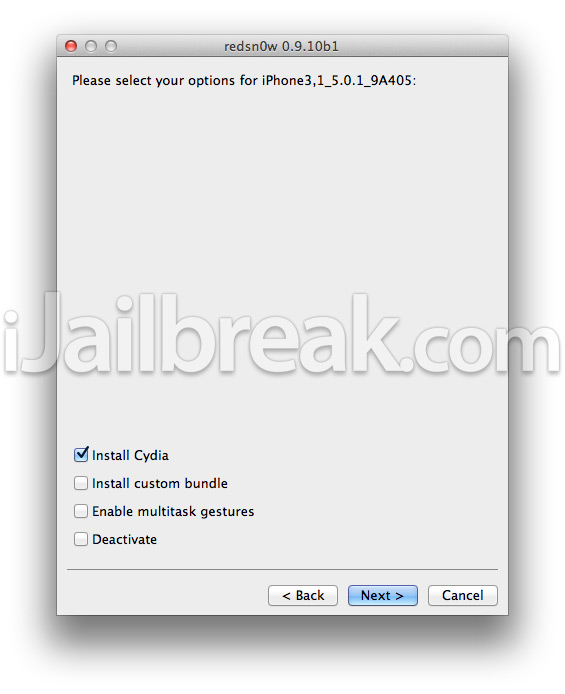
Step 8 ) – After you have specified your Jailbreak options you can click the next button and RedSn0w 0.9.10b1 will begin jailbreaking your iPhone. DO NOT interrupt or use the computer during this time. When your iPhone is finished being jailbroken it will reboot into an untethered state.
Step 9) – To ensure that this iOS 5.0.1 Untethered Jailbreak worked you will need to power off your iPhone and then simply power on your iPhone and wait for it to reboot itself. If your iPhone reboots into a usable state then this Untethered iOS 5.0.1 Jailbreak worked!
Troubleshooting: If you are having troubles using RedSn0w 0.9.10b1 to Jailbreak your iPhone Untethered on the iOS 5.0.1 firmware, we suggest you try the PwnageTool 5.0.1 or restore to the iOS 5.0.1 firmware and try Jailbreaking your iPhone fresh using RedSn0w 0.9.10b1 again.
Done! You should now have a untethered jailbreak on your iPhone 4, 3GS running the iOS 5.0.1 firmware. For more tutorials visit the How To Jailbreak Section. Leave any questions in the comments below.
The untethered jailbreak works, but the wifi signal doesn’t….i can’t connect to internet through my wifi
same here!!!! there are 2 routers in my house and it can find even one!
Will the spire/Siri port work with the 5.0.1 untethered jailbreak
oo thankyuuuuuuuuuuuuuuuuuuuuuuuuuuuuuuuuuuu
there is a big bag!!!!!!!!!!! after applying the jailbreak, the wifi signal disappear!!! fix it asap please
i meant bug ;)
I have an iPhone 4S running 5.0 should i update to 5.0.1 now?
I am stuck at exploting with limera1n! Any help?
i cant install cracked apps!!! ibooks dont work for me anymore!
is there a way to backup & restore cydia tweaks/cracked apps from ios 4 jailbreak when converting to ios 5? i know there are a couple of apps out there but does it work for this specifically?
I am eternally grateful, BUT will there ever be a GPS fix for the 6.15.00 baseband??
for me it does not work with my iPad 1, I can’t enter the DFU mode, i tried 10 times and I always get Failed to enter the DFU mode (with Pwnage tool too)
DELETES ALL ICONS after trying to install a package. Cydia installation is fine. Any Package installation deletes everything off phone, and forces restore.
!!!!!!!!DO NOT RECOMMEND !!!!!
try apt backup
Hell yeah sad..!!
no cydia packages.?! unknown error while adding cydia repos.!! >__<
w8ng for redsn0w to fix this..!!
I am still having problems trying to install sources and download packages from cydia….I working in IT know better to grab software the first day out and knew I should have waited…This will have me trying to fix this all night just to get CYDIA working like it used to before this jailbreak….or going back to a jailbreak for the tetherd version
I had run the redsn0w on mac lion version. but it was not work. Who is know what it is? Is this redsn0w for previous mac ver?
On the third phase of entering DFU mode it stops and says SHSH Error. Please help
Hey Eric, same problem here with my iPad 1. You fixed it allready ?
CANT CONNECT TO INTERNET!!! HOW CAN I FIX IT?
keeps coming up with exploit failed, and then I have to restore with itunes… this doesn’t work :(
mine did the same thing… there are very few details out there about
this! mine was able to find the router and connect eventually, but it
was hit and miss. i finally decided to restore, and now back to stock
iOS 5.0.1 i am having the same issue, so i am not sure if this is due to
the jailbreak or iOS 5.0.1… i only updated to the current iOS version
just before jailbreaking so i can’t be certain until i have time to
test. if you guys restore back to stock and still have the issue please
let me know!
WiFi not connecting or not detecting network, intermittently after Jailbreak. I can’t determine yet whether this was the jailbreak itself or the iOS 5.0.1 update; after I noticed the problems with WiFi, I restored my phone to stock and was still having issues connecting to my home network just as I did immediately after the jailbreak. There aren’t very many details out there concerning this issue, but I performed all of the rudimentary troubleshooting procedures people have been spreading over the last week or so including power cycling the router and phone, reset network settings, airplane mode on/off, forget network, restore phone and re-jailbreak, boot in tethered mode through redsn0w, none of it worked for me. Hopefully there will be a solution soon so I can try again…
Another thing: Some searching lent me to believe that the issue is due to my baseband being 4.11.08? It’s my understanding that if this is the cause of my problems with WiFi after 5.0.1 update/jailbreak, there is nothing I can do about it…
Mine reported exploit failed the first time I ran it, although the phone booted successfully to it’s usual state as soon as I disconnected and reset it. I googled and found someone reporting that when entering DFU mode at this point, you should continue to hold the Home button down past the 15 seconds. I held it down through processes 1 and 2 and successfully jailbroke. Hope this helps you. For reference, I am on an iPhone 4 and had just updated to 5.0.1 OTA after backing up.
Also should note I installed ultrasn0w from cydia per someone’s recommendation. did not help.
I have heard this over and over again. I hate to say it guys but 90 percent of the redsn0w downloads are virus ridden. I unlock and jailbreak phones as part of the business I own and I have been using redsnOw for a couple years now and found that as long as it is really RedsnOw, you keep it updated, and know what your doing it is the most stable program you can use and out of over 500 jailbreaks and unlocks I have had 0 thats right 0 problems.
my iphone 4 im trying to jailbreak works, but the new redsnow freezes at the 2nd stage of the build. i need this fixed. any tips?
If I had a version of iOS 4 on my ipnone 4 and someone who didn’t knew my phone was jailbreaked, updated my phone with a iOS 5, which jailbreak do I need to download?
considering the specification “Note #1: If you are already Jailbroken tethered on the iOS 5.0.1 firmware you may want to use the Corona 5.0.1 Untether Cydia package instead.”
it wont let me it keeps saying no data fetch
100% solution on post by juergenwest : remove cable from USB port upon completion of “uploading first stage” wait for audible disconnect indication, then reconnect, redsn0w will then proceed to uploading second stage