If you use Instagram on a regular basis, you will love the Cydia tweak.
For those of you who use Instagram on your mobile device you realize it is not easy to actually save a photo that catches your interest to the camera roll. You need to actually get the URL of the image and save it on your computer or take a screenshot of it; neither option is ideal.
Wouldn’t it be nice if Instagram had a built-in option to save photos to your camera roll? Well, thanks to the InstaSave Cydia tweak, this is now a reality. All that the InstaSave Cydia tweak does is add a Save button to a photo’s more options menu. Upon tapping the Save button, lo and behold, the photo is saved to your camera.
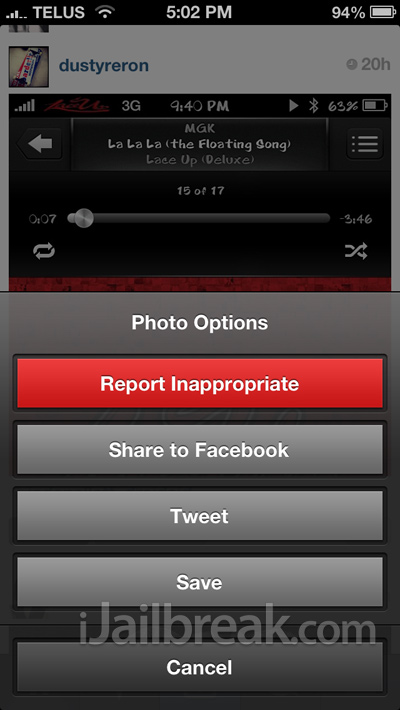
The InstaSave Cydia tweak won’t win any awards for being the most innovative tweak we have ever seen, but it is indeed useful for regular users of Instagram. If you are interested in the InstaSave Cydia tweak you can find it in the BigBoss repo for free. Let us know what you think of this useful tweak in the comments section below.
the settings on instagram already allows me to save to camera roll?
Not someone else’s photo though. This is anyone on your streams photos.
Thanks a lot for the news. My question is : Is there a tweak like this for Android user ?