Auxo is without a doubt probably one of the most popular Cydia tweaks in a long time to come about and for awhile I was all for the tweak. After restoring to iOS 6.1.2 to take advantage of the last Untethered Jailbreak however, I decided not to install Auxo… and here’s why.
For those of you who haven’t heard of Auxo however, or haven’t really had a chance to check it out. Essentially the tweak modified the App Switcher to add extended functionality such as toggles, app preview cards and more. Instead of displaying applications as icons in your App Switcher, Auxo replaces them with cards that show a screenshot of an app’s suspended state. If you swipe to the right you will also have access to various toggles, and also improved music controls. All-in-all it is a really cool tweak, that some people say Apple will actually copy in iOS 7.
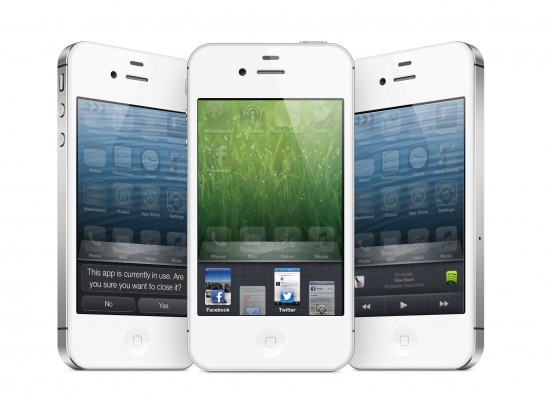
For me however, there were some hings that Auxo just wasn’t doing right, that actually lead me to uninstalling it and replacing it with another tweak we previously covered here on iJailbreak.
Grip #1: Stability
If you have used Auxo on iOS 6 you have no doubt come across some stability issues. Although the developers behind the tweak are working to constantly improve Auxo’s stability, I found it crashed way too much. Often times it crashed for me during the worst times as well, such as editing a Pages document or replying to an email. Although this area will improve, at the time of writing this article Auxo is just too buggy for my liking.
Gripe #2: Inconsistant App Cards
The App Cards, in my opinion, are what makes Auxo the tweak it is, I found a lot of times however, the screenshots for these App Cards were often missing which made it less aesthetically pleasing to the eye. Although this is nit-picky, it happened enough to where it bothered me.
Gripe #3: Swiping Gestures
Love them or hate them, Auxo’s swiping gestures to dismiss apps is pretty temperamental. Whenever I jump on my iPhone, I often times try to complete a task with lightning speed and I found that this resulted in my accidentally removing some apps from the multitasking tray I didn’t want to completely remove from backgrounding.
Gripe #4: Toggles
99 percent of the time, the only thing I use the App Switcher for is switching between apps. Actually having to tap a hardware button, then swipe to reveal toggles isn’t the most productive way to go about things. As I will talk about in a second, there is another tweak that makes this process a lot faster, has way more customization options and results in less use of your home button.
Am I saying Auxo is a bad tweak? Hell no! Auxo is a wonderful tweak and deep down I still love it. There are going to be some people that completely disagree with me on the gripes I made about the tweak, but hey, it’s my opinion. Despite all the things I don’t like about Auxo, the only reason I finally decided to uninstall it was because of a tweak called Battery Doctor Pro.
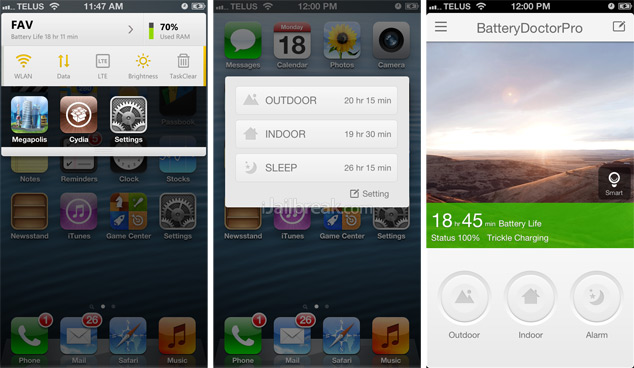
I am not going to go into this tweak extensively because we already have a very in-depth review on it, but essentially this tweak has the capability to replace a ton of other tweaks, and best of all it is free. Battery Doctor Pro allows you to optimize your battery performance, get access to toggles by tapping the battery icon and has more options than you can shake a stick at. Best of all, Battery Doctor Pro has no stability issues.
I urge you to read our full review on the tweak, if you haven’t already, but thanks to Battery Doctor Pro I have replaced Auxo and maybe even saved you some money.
What do you think? Do you like Auxo and disagree with me? Is Battery Doctor Pro a good replacement? Share your thoughts in the comments section below.
Too bad Auxo is so unstable thats the reason I uninstalled too but it’s a handy tweak!
Battery Doctor Pro is awesome
BatteryDoctor Pro is really great application, have everything that somebody can wish from an app and change a lot of other tweaks. I used it for a while but after some time I deleted the app. Main reason is because drains the battery very fast. Without this app my iphone 4 can provide 3-4 days of use, with this app in best case 2 days. It continually works in background which affect on battery life. 3/5
I’ll install Battery Doctor Pro, no that you (iJailbreak) love it. i have iPad so I couldn’t install Auxo.
I do not understand your point on this post? They are two completely different apps. They made Doctor Pro work with auxo, I use both of them. Its great that you uninstalled it, mine is completely stable,but where does Doctor Pro come into play? It is not like Auxo where it is basically a task manager and shows what page you were on and allows you to dismiss tasks with a swipe.
Auxo still have big memory leak on 4s, after 10 uses free memory was going down to 10MB and then device restarted. On iPhone 4 it restarted randomly as the author wrote. This could be nice piece of software, but the issues kill this app.
Look bro After you write about Batterydoctorpro,same day i delite SBSettings , Auxo,and Couple more tweaks and add BDpro lol ,and its perfect tweak “Best of the best”and from that day i never got any crash on my iphone 5 ios 6.1 ,thank you again :))
BDPro does seems like a wonderful tweak- but i CBB with it (guess im kinda reluctant to let go of my SBsetting as well as laziness) – I just usually use NC toggles or just have a stausbar activation for my sbsetting toggles.
This replced SBSettings on my iPod touch. It seems more stable and is quite amazing!!!
I still use both BatteryDoctorPro and Auxo, the only thing i love about Auxo is the way you can swipe and close the taps and multiple closing tab style, i never was much intrested in those last page options of Auxo, and about the stability issues i guess must be in ur phone, i own 5 iPhone devices working fine and perfect on all of them :D
Is this a review or a bug fix request
Indeed, Was tired of it crashing my phone constantly while I played music from either a music radio or the music.app when switching between apps. If the developer did something about rather than tell everybody on twitter that this bug shouldn’t exist and thinking its caused by a tweak, he’d have made a legendary tweak needed for every jailbroken phone.
Sounds like your running a cracked version of it… I had that problem too when I installed the cracked version. But then I bought it and there were none of those problems. It works perfectly. Never a single crash.
BatteryDoctor Pro and Auxo are great, but very unstable when I removed the two realized that I had released a lot of ram on my iPhone 4S, and I ended up gaining much performance in games and heavier applications. Unfortunately I had to remove them and re-use NCSettings …
does anyone know why my music player skin wont change on ios 6.1.2?
Possibly the greatest tweak of all time. It replaces Auxo, sbsettings and killbackround. Simply amazing!!!!
I really like Battery DoctorPro, but I use it in conjunction with zephyr and BDP really for the ease of closing apps with a swipe. I do like the previews of app cards as well. But mainly it is for closing apps with a swipe…
Auxo fixed the memory leak in newest update but if you had it cracked it crashed. Battery Doctor Pro has MAJOR problems that lead to quite a bit of reformats. (huge issue on Reddit) @ithemebig