RapidContact: Send A Text Message/Make A Call Using Activator
RapidContact is a Cydia tweak that I am sure a lot of you are going to love. With the tweak you can easily send a text message or make a call to a contact of your choice by carrying out an Activator command.
Upon carrying out the configured Activator command a window will pop up asking you to search for the contact you wish to text message or call. Simply search and select your contact, and press either one of the two buttons presented to text message or call your selected contact.
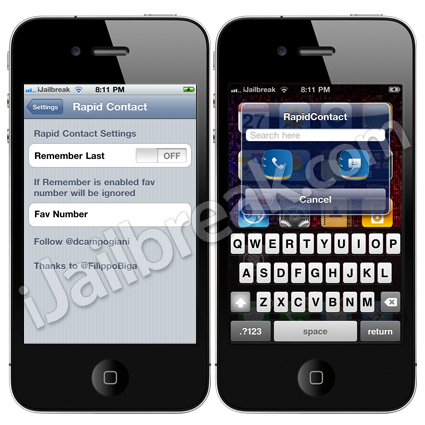
If you are interested in RapidContact you can find it through the BigBoss repo for free.
Friday13: Customize The Calendar Icon
With the Friday13 Cydia tweak you have complete control over the calendar icon on your SpringBoard. You can set a custom date (which by default is set to Friday the 13th), customize the colors of the Calendar.app, and even change the layout of the Calendar.app. The tweak really is a neat one if you would like to make your iPhone, iPod Touch or iPad stand out from the crowd in a small way (without having to heavily customize your iDevice with WinterBoard or DreamBoard).
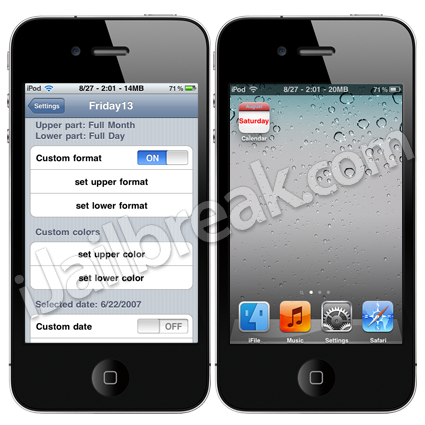
The Friday13 tweak is available from Cydia via BigBoss repository for free.
VoiceKeys: Speech To Text Using Google’s Speech Recognition Service
With the VoiceKeys Cydia tweak you can convert speech to text using Google’s Speech Recognition Service. Simply activate the tweak using Action Menu (which is automatically installed with the tweak) and begin speaking. When you are finished speaking you press the Recognition Button that is present, and by using Google’s Speech Recognition service your speech will be converted into text. Additionally, you can activate the tweak by using your iPhone’s proximity sensor.

If you are interested in VoiceKeys you can find it through the BigBoss repository for free.
Are you going to download any of these jailbreak tweaks? Make sure you let us know in the comments.
I wonder if this tweak calls up BiteSMS or the original messaging app. This does look interesting thou. I’ll wait, as I usually do, for few days until all bugs have been worked out and try it out.
Thanks for sharing.
Ron