Whited00r 6 was released today that is essentially a pre-Jailbroken custom firmware file based on 3.1.2 that brings about the functionality of the iOS 6 firmware, as well as various performance improvements. You can now get features such as the Reminders app, Folders, Cloud backups and more on your iPhone 2G, iPhone 3G, iPod Touch 1G or iPod Touch 2G (MB model only).
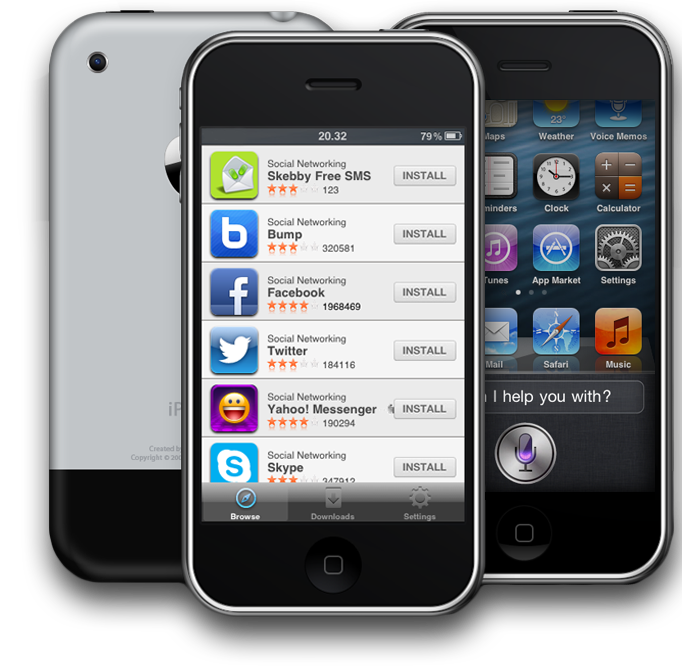
Just how do you go about install Whited00r 6 to your iPhone or iPod Touch? Well, the process is actually more simple than you might think. In this tutorial you will learn how to install Whited00r 6 to your older generation iOS device.
How To Install Whited00r 6
Step 1) – The first thing you will need to do is backup your iPhone or iPod Touch. As installing Whited00r requires you to restore your iOS device, you will lose all the data on your device unless you back it up. The Whited00r development team state the following:
The installation process is safe and tested, but you are doing this at your own risk. For this reason we suggest that you backup your data (our firmwares have include an iCloud-like application to backup your Game saves to dropbox since Whited00r 5), and transfer your applications from the device back to iTunes on your computer by following these simple steps: Right click on your device name in iTunes, select “Backup” and then “Transfer Purchases”. You also could use other software like DiskAid to manually backup data, if you prefer.
It is recommended that you do not restore from an iTunes backup after installation to avoid errors.
Step 2) – The next thing you will need to do is actually download the Whited00r 6 firmware. You can do this from one of the download links shown below. According to the Whited00r development team “you should choose Whited00r Normal version only if you can legitimately activate you device via iTunes AND you don’t need carrier unlock (so you are using the original SIM card, for example form AT&T). All other users should choose Whited00r Unlocked firmware. If you are not sure use Unlocked firmwares.”
Download Whited00r 6 for iPhone 2G [Normal] / [Unlocked], iPhone 3G [Normal] / [Unlocked], iPod Touch 1G and iPod Touch 2G (MB Model only)
Step 3) – The next thing you will need to do is open up iTunes, click on your device and then restore the Whited00r firmware to your device. To do this on Windows hold the SHIFT button and then press Restore. On Mac OS X you will need to hold down the ALT button and then press Restore. Once you have done this a new window will appear where you will need to select the Whited00r firmware.
Step 4) – The restoration process can take up to 15 minutes and once it reboots into a working state make sure you “Set up as new” to avoid errors.
Congratulations! You have just fully installed Whited00r 6 on your iPhone or iPod Touch. Keep in mind that tapping the App Store will bring you up to a menu that includes the ability to launch the regular App Store, Whited00r App Store, Backups and Cydia (swipe left or right). For further instructions on using terminal you can visit the Whited00r website.
So i dont understand…can you download viber or facebook for all versions??
are you kidding me? Its simply jailbreaking without cydia and with ios 6 features. Downloading apps depends on having the firmware needed to use the app.
Not too sure about the specific app functionality, you would need to try it out for yourself. I only briefly tested it. Cydia is indeed installed though as well.
you wil be able to download facebook(dont know about viber)but it will be a facebook(older version)that runs on ios 3….since whited00r is based of ios 3. Thats y they have 2 app stores..one is the whited00r store and the second is the original App Store.
danmit this is why i need a better laptop so i can help out …whats the point of knowing how to make/troubleshoot apps if you dont have a decent laptop to do the work. X_X
i keep getting a 1604 error and I tried apple’s solution, but it didn’t work. Any word on how to solve it?
restore your device to stock IOS(un-jailbroken) then put it in dfu mode then run i reb and select your device in the menu once you see the message with the click ok dont click ok leave it there then run itunes shift+click restore then select whited00r 6 and voila it should start restoring.
can you make a custom firmware based on ios 4.2.1 ?
so that a lot of apps can be used ?
It says filmware is not supported help?
my phone got crash, i cannot use it anymore. once i unlock it will apear in the emergency call. help plz
does this mean I can download apps requiring ios5?
Help please! i tried so much, but the same 1604 errors. searched for a solution, downloaded redsnow and also 3.2.1 firmware but redsnow got stuck in reboot process.
can any1 help me wat can i do.
i have ipod touch 2g (MB model)
when I was searching for the file I couldn’t find it :(
Guys use this.!!!
Whited00r 6 for iPhone 2G [Normal]
Try to uninstall itunes then install it again then try it
I hope this works
hello i have an old iphone 2g .. how can i update tjis iphone 2g? i already try but it never been updated.. please hepl