With Apple releasing the iOS 6.1.1 beta firmware today it is a good reminder for you to save your SHSH blobs before it is too late! I know what you might be thinking… why should I save my SHSH blobs when they are not even useful on A5/A6 devices? Well, because you never know what the future holds and with SHSH blobs you can still restore A5/A6 devices to the same firmware version you are currently running which can be useful if you feel like starting afresh. Without saved SHSH blobs you wouldn’t even be able to restore back to iOS 6.1 when Apple release iOS 6.1.1.
Just how do I save my iOS 6.1 SHSH blobs then? Well, I am glad you asked. In order to save your iOS 6.1 SHSH blobs you need to a program called TinyUmbrella that is compatible with both Windows and Mac OS X. In this tutorial you will learn how to save your iOS 6.1 SHSH blobs on your iPhone, iPod Touch or iPad with TinyUmbrella.
How To Save iOS 6.1 SHSH Blobs
Step 1) – The first thing you will need to do is download and install TinyUmbrella to your computer.
Download TinyUmbrella Mac OS X
Download TinyUmbrella Windows
Step 2) – With TinyUmbrella downloaded you will need to launch it and then connect your device to your computer via the USB cable.
Step 3) – Now in the left sidebar select your device, go into the Advanced tab and deselect ‘Save ALL Available SHSH’ and ‘Request SHSH From Cydia.’ While you are in the advanced tab you can also change the directory that the SHSH blobs will be saved to if you so wish. Once you have done this click the Log tab so that you can ensure everything goes smoothly in step 4.
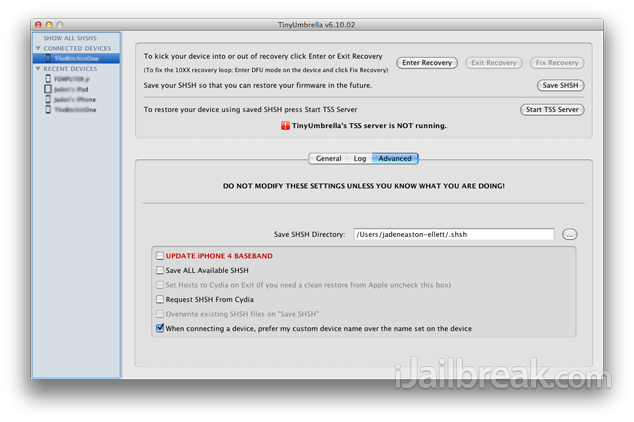
Step 4) – Now you will need simply click the Save SHSH button and TinyUmbrella will begin saving the SHSH blobs for your device running iOS 6.1 (or any firmware version for that matter). Once you click this button you should see a SHSH successfully saved message in the console, which means your SHSH blobs have been saved to the folder you specified in step 3.
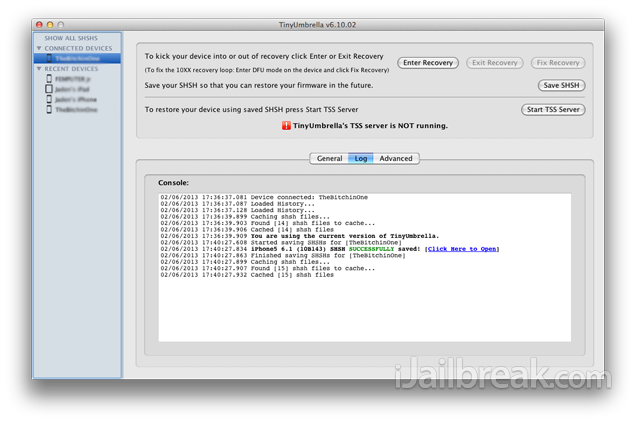
Congrats! You have now saved your iOS 6.1 SHSH blobs. Before patting yourself on the back you will probably want to double check that your SHSH blobs actually saved to the folder you specified. Once you do this, you can have the peace of mind that you have took all the steps you can to safeguard yourself against future iOS updates.
I cannot get the TinyUnbrella to run. I’ve turned off firewall & downloaded it from the above link. I click run, it starts; goes to “Verifying libraries”…the says unable to ???? do something, I cannot read it because it closes very quickly and the process stops.
How do I get the software to open/work? Any ideas?
Using Windows Vista Home Edition on a Compaq PC.
TU won’t work on my Windows 8 laptop. I had Java version 11 installed.
Once again you have put your penetrating mind to the task and once again come up incorrect.
I thought Tiny Umbrella had access to the SHSH blobs that Cydia saves?
how can i get the TU working? i already have the latest java version installed. run as administrator, run compatibility mode.
its working well on win 8 Desktop bro.