This guide with show you how to unlock iPhone 3G/3GS on iOS 4.1 and iOS 4.2.1 using Ultrasn0w version 1.2.
Note: Make sure you have read the following information here about the latest release of Ultrasn0w and PwnageTool 4.1.3.
iPhone Dev Team’s iPhone 4, 3G and 3GS software unlock, now with added PwnApple. Compatible with iPhone 4 baseband 01.59.00 and iPhone 3G/3GS basebands 04.26.08, 05.11.07, 05.12.01, 05.13.04 and 06.15.00! Thanks to @sherif_hashim and @Oranav for contributing baseband crashes.
Step 1: Sync your iPhone with iTunes to back-up all your important data including settings, apps, music, contacts and photos.
Step 2: Jailbreak your iPhone using the latest version of PwnageTool (4.1.3), and upgrade to baseband 6.15.00. Follow our guide here.
WARNING — YOU DO THIS AT YOUR OWN RISK! PLEASE UNDERSTAND THE CONSEQUENCES OF UPDATING TO 06.15.
- There is no way to come back down from 06.15, and there’s no hiding the baseband version from Apple. You’ll be voiding your warranty in a very obvious way.
- If some future baseband comes out with a critical fix, you won’t be able to update to it if it remains down in the 05.xx sequence (then again, you wouldn’t update to it if you wanted to keep your unlock anyway).
- Starting with FW 4.2.1 if you have 06.15 on your iPhone you won’t ever be able to restore to stock firmware (it will fail). You’ll need to only restore to custom IPSWs (then again, if you’re unlocker you should already be doing that).
Certainly don’t update to 06.15 if you don’t need to! Only do this if you need the unlock and you’re stuck on 05.14 or 05.15, and you’re willing to assume the above risks.
Step 3: Launch “Cydia” on your iPhone.
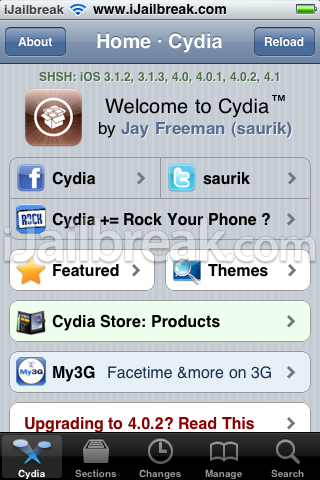
Step 4: Typically, the Ultrasn0w repo is included with Cydia. If not, tap the “Manage” tab located on the bottom tab bar.
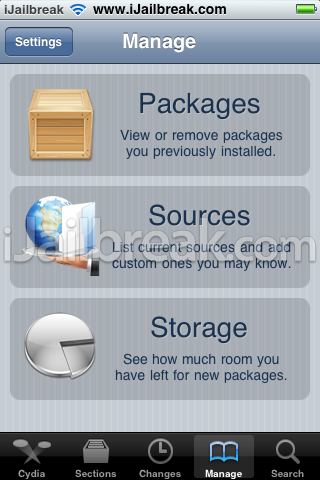
Step 5: Tap “Sources”, “Edit”, then “Add”. You’ll be prompted to add URL source. Type “http://repo666.ultrasn0w.com” and tap “Add Source”.
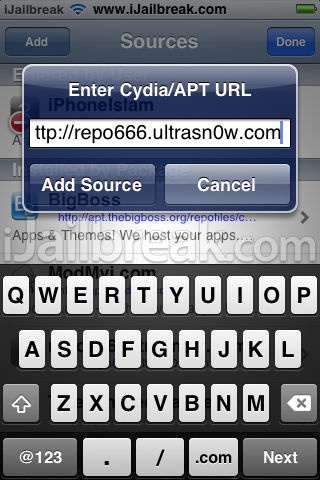
Step 6: Cydia automatically refreshes and updates sources.
Step 7: After Cydia is done refreshing sources. Tap the “Search” tab on the bottom tab bar and search for Ultrasn0w. Once Ultrasn0w appears, tap and you should see version “1.2″. Ultrasn0w is a software unlock for your iPhone, so you can use it with any carrier by simply inserting the SIM card.
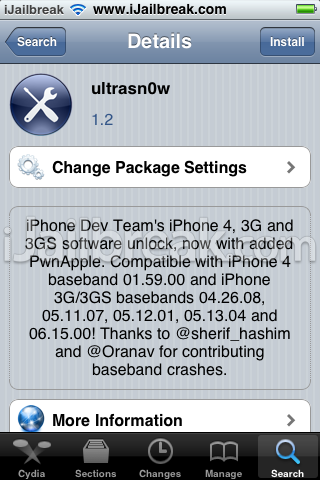
Step 8: Restart iPhone and voila! Your iPhone should now be fully unlocked.
Note: We are not responsible for any damage or loss of data on your iPhone . Use at your own risk.
Thanks for the dev.team. But we with iphone 4 baseband 02.10.14 got no good news yet. well we got to wait, since dats d only option we’v got.
so this means 4.2.1 iphone users cant unlock there phones and use t-mobile with it ?
i cant get t mobile bar on my unlock phone
when can we jailbreak and unlock iphone 4 with ios4.2.1?
that is after all what everyone is waiting for!!!
4.2.1 users CAN unlock but only on 3G and 3Gs…not on iPhone 4.
yeeeeesss woooooohoooooo my iphone is accepting all card :DDDDDDDDDDDDDDDDDDDDDDDDDDDDDDDDDDDDDDDDDDDDDDDDDDDDDDDDDDDDDD (party)
Can’t you just update the firmware to 5.0.1 then jailbreak and unlock it. That way in the future apple wont be telling you that “Sorry you can’t use this you must update to the latest firmware” if you have 5.0.1 you will be able to use stuff 4.2.1 can’t use. For example iCloud. But it’s just a suggestion I upgraded then unlocked its working perfectly.
i hav unlocked my iphone with redsnow 0.9.6b5 all sim cards are working but cydia tels m to ugrade it to 1.1 version .can i upgrade it with redsnow 0.9.10b3 using vodafone sim because previously it was airtel locked! currently application which i download from cydia packages are not workin .. sum1 help
Hello, I am struggling with the last step. When installing ultrasn0w 1.2.7 my iPhone 3G displays “Could not activate cellular data network”. Even if it is turned on in the settings. I have tried twice and always the same problem the SIM card is not working. What should I do?
Tx
hi,try re-installing ultrsnow and mobile substrate ,then turn off the 3g in network, and reboot.
Thankssssssssssssss Aloooooootttttttttt It worked!! I was really worried bout this shit and now um dancing..(: