The RedSn0w Jailbreaking tool could be considered the staple Jailbreaking tool. Although there are many Jailbreaking programs out there, RedSn0w has been one tool that has been consistently updated throughout the years, whereas other Jailbreaking tools have since faded out of existence. It should be no surprise that because of this fact RedSn0w is probably the most widely known Jailbreaking tool.
RedSn0w actually evolved from the Jailbreaking tool Quickpwn, which was an early Jailbreaking tool used to Jailbreak the 2nd generation of iOS. Nowadays RedSn0w can be used to Jailbreak almost all firmware versions of the iPhone, iPod Touch and iPad.
One of the great benefits to RedSn0w is that it is cross compatible with both Mac OS X and Windows. In the past some Jailbreaking tools (example: PwnageTool and Sn0wBreeze) have been operating system specific, and this really limited the userbase of that tool. RedSn0w is always available for both Mac OS X and Windows at the same time, so no usergroup is left in the dark.
Yet another advantage to the RedSn0w Jailbreaking tool is that it encompasses so many additional features. Nowadays RedSn0w really is your go-to tool for everything Jailbreaking related. It allows you to save SHSH blobs, create custom IPSW (firmware files), fix Recovery Mode loops and so much more. If you are thinking about Jailbreaking your iPhone, iPod Touch, or iPad, RedSn0w would be your tool of choice.
RedSn0w Device Compatibility
RedSn0w is compatible with almost all generations of the iPhone, iPod Touch and iPad running firmware versions all the way back to iOS 3. You can take a look at the devices and firmware versions RedSn0w currently supports below. Keep in mind that we will update the RedSn0w compatibility chart when new versions of RedSn0w are released to ensure it is always up to date.
Latest RedSn0w Untethered Jailbreak: iOS 5.1.1
Latest RedSn0w Tethered Jailbreak: iOS 6.0.1
Latest RedSn0w Beta Jailbreak: iOS 6.1 Beta 3
RedSn0w iPhone Support
iPhone 6s Plus: Not Supported
iPhone 6s: Not Supported
iPhone 6 Plus: Not Supported
iPhone 6: Not Supported
iPhone 5s: Not Supported
iPhone 5c: Not Supported
iPhone 5: Not Supported
iPhone 4S: iOS 5 (iOS 5.1.1, iOS 5.0.1, iOS 5.0)
iPhone 4: iOS 6 (iOS 6.0,6.0.1) + iOS 5 (iOS 5.1.1, iOS 5.1, iOS 5.0.1, iOS 5.0) + iOS 4 (4.3.5, 4.3.4, 4.3.3, 4.3.2, 4.3.1, 4.3, 4.2.6, 4.2.1, 4.1, 4.0.2, 4.0.1, 4.0) + iOS 3 (iOS 3.1.3)
iPhone 3GS: iOS 6 (iOS 6.0, 6.0.1) + iOS 5 (iOS 5.1.1, iOS 5.1, iOS 5.0.1, iOS 5.0) + iOS 4 (4.3.5, 4.3.4, 4.3.3, 4.3.2, 4.3.1, 4.3, 4.2.6, 4.2.1, 4.1, 4.0.2, 4.0.1, 4.0) + iOS 3 (3.1.3)
iPhone 3G: iOS 4 (4.3.4, 4.2.1, 4.1, 4.0.2, 4.0.1, 4.0) + iOS 3 (3.1.3)
RedSn0w iPad Support
iPad Pro: Not Supported
iPad Air 2: Not Supported
iPad Air: Not Supported
iPad Mini 4: Not Supported
iPad Mini 3: Not Supported
iPad Mini 2: Not Supported
iPad Mini: Not Supported
iPad 4: Not Supported
iPad 3: iOS 5 (iOS 5.1.1)
iPad 2: iOS 5 (iOS 5.1.1, 5.0.1)
iPad 1: iOS 5 (iOS 5.1.1, iOS 5.1, iOS 5.0.1, iOS 5.0) + iOS 4 (iOS 4.3.5, 4.3.4, 4.3.3, 4.3.2, 4.3.1, 4.3, 4.2.1) + iOS 3 (iOS 3.2.2)
RedSn0w iPod Touch Support
iPod Touch 6G: Not Supported Yet
iPod Touch 5G: Not Supported Yet
iPod Touch 4G: iOS 6 (iOS 6.0, 6.0.1) + iOS 5 (iOS 5.1.1, iOS 5.1, iOS 5.0.1, iOS 5.0) + iOS 4 (iOS 4.3.5, 4.3.4, 4.3.3, 4.3.2, 4.3.1, 4.3, 4.2.1, 4.1, 4.0.2, 4.0.1, 4.0) + iOS 3 (3.1.3)
iPod Touch 3G: iOS 5 (iOS 5.1.1, iOS 5.1, iOS 5.0.1, iOS 5.0) + iOS 4 (iOS 4.3.5, 4.3.4, 4.3.3, 4.3.2, 4.3.1, 4.3, 4.2.1, 4.1, 4.0.2, 4.0.1, 4.0) + iOS 3 (3.1.3)
iPod Touch 2G: iOS 4 (iOS 4.3.4, 4.2.1, 4.1, 4.0.2, 4.0.1, 4.0) + iOS 3 (iOS 3.1.3)
How To Download RedSn0w
RedSn0w is maintained and developed by a group of hackers by the name of the iPhone Dev-Team. As such you can always find the latest version of RedSn0w from their blog. iJailbreak also maintains a downloads section that always contains the latest version of RedSn0w. Just visit the iJailbreak Downloads Section and download the version of RedSn0w that is bold. This signifies that it is the latest version.
The Basics Of RedSn0w
RedSn0w is a Jailbreaking tool that will Jailbreak your iPhone, iPod Touch or iPad without it losing any data. This means once you Jailbreak your device with RedSn0w all the content on your device prior to being Jailbroken will be present. Some Jailbreaking tools like The PwnageTool or Sn0wBreeze require you to restore your device to complete the Jailbreaking process. This results in all the data on your device being erased.
The difference between a Tethered and Untethered Jailbreak
There are two types of Jailbreaks available when you go to Jailbreak your iPhone, iPod Touch or iPad – a Tethered Jailbreak or an Untethered Jailbreak. An Untethered Jailbreak means that your device will function as normal once Jailbroken. A Tethered Jailbreak on the other hand is different. It means that when you Jailbreak you cannot power your device off. When you do this while your Jailbreak is Tethered it means in order for your device to turn back on you will need to plug it into the computer and re-run RedSn0w over again. Once you do this your device functions as normal… no data is lost. Hence the term tethered, because you are Tethered to your computer.
Now why would a Jailbreak be Tethered? Well the only reason a Jailbreak would be Tethered is if the developers behind the Jailbreak for a specific firmware version are having a hard time Jailbreaking it. If this is the case often times they will release a Tethered Jailbreak and then an Untethered Jailbreak later on once they find a suitable exploit.
How to launch RedSn0w correctly
With that out of the way, there is one more piece of information you need to know before you launch RedSn0w…. and that is actually launching RedSn0w. If you are running RedSn0w on Windows you will need to ensure you grant it administrative privileges by right clicking it and selecting the run as administrator option. On Mac OS X Mountain Lion, because of the new Gatekeeper software, there is also a trick to running RedSn0w. You will need to first hold down the control button and then select the open option.
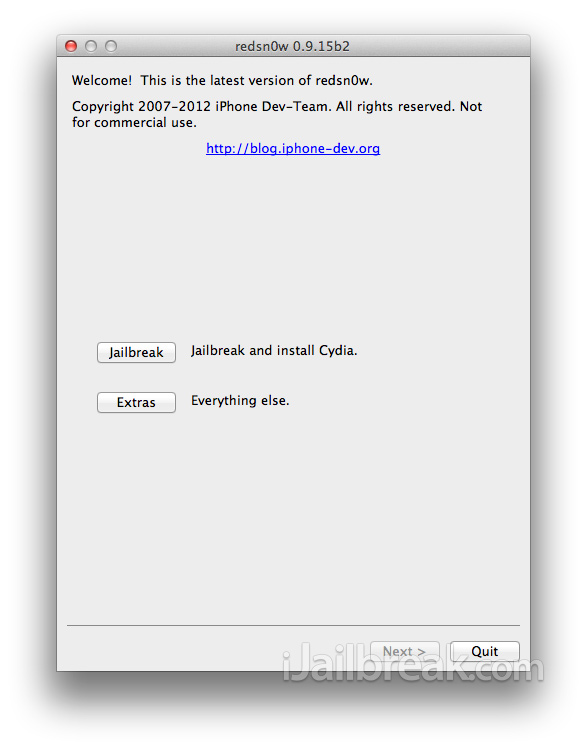
Navigating Around RedSn0w
When you first launch RedSn0w you should see two buttons presented to you – Jailbreak and Extras. Clicking the Jailbreak button will start the Jailbreaking process and clicking the Extras button will allow you to see some of RedSn0w’s additional features. How to Jailbreak with RedSn0w will be covered separately, but we will dive into some of the additional features of RedSn0w now. Keep in mind that if you don’t see one of the features mentioned below it could be because you are using an outdated version of RedSn0w.
- Just Boot: If your iPhone, iPod Touch or iPad is Jailbroken Tethered then you will need to use this option to reboot your device into a working and Jailbroken state. Clicking this button will prompt you to enter a special mode called DFU, where RedSn0w will then proceed to properly rebooting your device.
- Pwned DFU: When you create a custom firmware file using RedSn0w, often times when you try to restore your device to it, iTunes will give you an error. Placing your device into Pwned DFU mode is a special variant of DFU mode that will reduce that chance iTunes will fail during a custom firmware restore.
- Recovery Fix: Sometimes when you Jailbreak your iPhone, iPod Touch or iPad and install certain extensions it can cause your device to go into an endless Recovery mode loop. If you ever find yourself in an endless Recovery mode loop, you can use this option to get out of Recovery mode.
- SHSH Blobs: When you need to fetch, verify or use SHSH blobs you can go into the SHSH Blob menu and do a variety of things, like creating custom firmware files that will let you downgrade your device to a lower firmware version than it is currently running. This will be covered in more detail later on.
- Select IPSW: Often times when Jailbreaking with RedSn0w you will never need to manually select the firmware you are trying to Jailbreak because RedSn0w detects it automatically. If for some reason the firmware you are trying to Jailbreak isn’t recognized, you can use this option to specify the firmware version for RedSn0w.
- Custom IPSW: RedSn0w actually has the ability to create custom firmware files for your iPhone that does not contain a baseband upgrade. This is only useful for people who have an unlocked iPhone that are required to stay on a certain baseband version. Creating a custom firmware file without the baseband update allows that particular iPhone owner to update to the latest firmware version and still maintain their unlock.
- Even More: What, you thought this was all the features packed into RedSn0w? Not even close! There is a whole whack of other features just waiting for you when you click this button.
The features we just covered were the most-used features in RedSn0w. These next features in RedSn0w are only available when you click the Even More button in the Extras menu.
- Restore: This option will bring you to a new menu that will allow you to downgrade your iPhone, iPod Touch or iPad to a lower firmware version than it is running now. It requires you to have saved SHSH blobs. This functionality is also accessible through the SHSH Blobs section by clicking the Stitch button.
- Identify: If you are looking to find out more technical information about your iPhone, iPod Touch or iPad, RedSn0w’s identity functionality can help you. Upon clicking this option you can find out information like your iPhone’s IMEI number, serial number, model number and much more.
- Backup: For those that have a file they want to backup on their Jailbroken iPhone, iPod Touch or iPad, you can use the Backup option to do just this. Upon clicking the Backup button you will need to specify the location of the file that you are trying to backup and RedSn0w will create a timestamped .zip file of that folder. This feature is often used for backing up activation tickets.
- Tickets: If you used the Backup feature to backup your iPhone’s activation tickets you can put them back on your iPhone by using the tickets feature.
- DFU IPSW: For devices that have a broken home button and can’t enter DFU mode you can create a custom IPSW that upon being restored will place your iPhone, iPod Touch or iPad into DFU mode for you.
- Preferences: We’re not done yet! RedSn0w has even more options that are available by clicking this button.
These next features that we are about to detail are for advanced users and are rarely ever used by everyday people. We will not be covering every single feature. In order to access them you will need to click the Preferences button in the Even More menu.
- ECIDs: Clicking this button will list all of the saved ECIDs used by RedSn0w. For those of you who don’t know what an ECID is, it is an identifier unique to every Apple device. ECID stands for Exclusive Chip ID or Electronic Chip ID.
- Boot Args: This option gives you the ability to execute terminal commands while running RedSn0w. For a list of valid arguments you can browse through boot-ipt4g.command. Keep in mind that this functionality is only for advanced users who know what they are doing.
- Boot Logos: RedSn0w gives you the ability to specify a boot logo to replace the default “Pwnapple” logo. Keep in mind that the image you are specifying must be in the correct dimensions for the device you are Jailbreaking and it must be in a .png format. Custom boot logos are only ideal for Untethered Jailbreaks.
How To Jailbreak With RedSn0w
Now that you understand all of the features of RedSn0w you can Jailbreak your iPhone, iPod Touch or iPad running RedSn0w, as long as it is supported (check the RedSn0w compatibility section near the beginning of this article). The process for Jailbreaking your iPhone, iPod Touch or iPad is often different depending on the generation of your iOS device and firmware version you are running. As such, we have written how to guides for each specific scenario that can be accessed from our How To Jailbreak Section.
If you feel that you are pretty technologically savvy however, most of the time you can figure it out yourself by connecting your device to your computer through the USB cable and then simply clicking the Jailbreak button. RedSn0w provides on-screen instructions that will help you the whole way through.
How To Manage SHSH Blobs With RedSn0w
SHSH blobs (and APtickets) are a technology that Apple uses to verify firmware restores. They are essentially a gatekeeper to firmware restores and make it impossible to downgrade your iPhone, iPod Touch or iPad to a lower firmware version than it is currently running. That is unless you have saved a previous firmware versions SHSH blobs!
You can learn more about SHSH blobs from iJailbreak’s SHSH Blobs section, but for those of you who have a basic understand, you will be glad to know RedSn0w includes an SHSH Blob management section. In this section you do things like create custom firmware files with stitched SHSH blobs that will allow you to downgrade, fetch SHSH blobs from Cydia and more. To access the SHSH Blobs section launch RedSn0w, click the Extras button and then the SHSH Blobs button. You will now see six options.
- Fetch: This option will find whatever SHSH Blobs are associated with your device and will submit them to Cydia’s server.
- New: If you have not saved your SHSH blobs for a specific firmware version you can use RedSn0w to do just this and then submit them to Cydia’s server.
- Verify: For those of you unsure what SHSH blobs are available you can use this feature to verify what SHSH blobs are available for your device.
- Submit: If you used an additional tool like TinyUmbrella to save SHSH blobs you can use this option to select them and submit them to Cydia’s server for caching.
- Query: This option will query Cydia’s server to find out what SHSH blobs you currently have cached. This functionality requires your device’s ECID that can be found out by using the Identity feature in the Even More section.
- Stitch: The stitch option will allow you to create a custom firmware file that will allow you to downgrade your iPhone, iPod Touch or iPad to a lower firmware version than it is currently running. The only requirement is that you have saved SHSH blobs for the firmware you are trying to downgrade to. To create the custom firmware file simply click the button, select the IPSW by clicking the IPSW button and then select your SHSH blobs by clicking either the Local button (if they are stored on your computer) or the Remote button (if they are stored on Cydia). You will then just need to continue following the on-screen instructions.
Talk about information overload! If you didn’t understand everything, fear not. This is all the features present in RedSn0w and chances are you will not use all of them. Most users are content with just clicking the Jailbreak button and enjoying their Jailbreak.
No joy. Hangs on exploiting with Limera1n. JB v.
RedSn0w 0.9.10b4 IPhone 3GS
why when i download redsnow…… and run it it just like a blank sheet of paper…. plzzz help.
red snow for window….. and connot run as admin. help
what is for my ios 5.0.1 iphone 4 cdma plz help me
Hey thanks alot for the jailbreak!
hackactive Ip 4s ATT plz
i have an ipod touch 4th gen with ios 4.1 i need some help!!! is there a good video out there to help me?!?!
I have iphone 3G on modem firmware 05.15.04. I wonder if redsn0w can jailbreak my iphone. Response is appreciated.
i have an iphone 4 Build IPHONE 3,1_5.1_9B176 which uses the gervey sim ,i have downloaded RedSn0w 0.9.10b6 for windows, i managed to jailbreak it, went on to just boot. when the phone switchs on it jus starts serching the it says no service, it instructs me to call 112 for less tha 3 seconds then go to flight mode but i never get the no sim card installed or sim falure message. Can any help me. Plizzzzz
thankzzzz
any you tube video available for ios 5.1 A5 i phone 4s ?
nothing pops up? just a blank screen? try re-downloading, are you using the newest version?
My redsn0w pops up with an error window that says “Incomplete iTunes libraries – Certain operations (like the A5 jailbreak) are disabled due to incomplete iTunes libraries. Please be sure the latest iTunes is installed. – Couldn’t load Mobiledevice.dll (error 127)”….how do I get around that?
This download isn’t compatible with Mac?
please help!!
When will RedSn0w support iphone 4s???????????????
mine is 5.1 9b179 any software????????????????????
need help …. i got iphone 5.1 9b179 and need to jailbreak it ?? thx
put
redsn0w here C:Program FilesCommon FilesAppleApple Application Support and then open it
i try this application but my iphone4s shut down what should i do? please help
PLEASE HELP!!!!!! MY IPHONE4S SHUT DOWN WHEN I’M TRY THIS SOFTWARE MAYBE IT COME FROM DFU. WHAT SHOULD I DO?
PLEASE HELP!!!!
press power button and center button together for 5 sec for reset. repeat if necessary.
yes, same problem here :(
but it said “Couldn’t load CoreFoundation.dll (error 126)”
help me my iPod is not jawbreaking because I do not have the sit to jailbreak
hey i have the same problem!!! error 127, i haven’t found a solution, how about you??
is it real that absinthe release unthered jailbreak of ios5.1.1 and 5.1
same problem
This gets me passed the error. But as soon as the iPhone gets to 100% on the “backup device” progress it stops and gives me “Error 2000”
hey, after i get to …Apple i can only see “internet services” and “mobile device support” but no “apple application support. :(
error 2000, same here..
i was getting the error 2000 alos. i just put my iphone in DFU mode. and reopened redsnow. it jailbreaks it like it use to with the ramdisk.
also**
for any of u having problems try absinthe 2.0.1 or snow breeze 2.9.6.
i messed while going to dfu mode and now my ipad2 is not opening…..what am i supposed to do ????
this worked, haha thanks, cant believe i didn’t think of this
It’s in the ‘Program Files (x86)’ folder, and it works a treat (strangely). Thanks Yuki
My ipod was running on ios 5.1.1 and it was slow so decided to restore it to the same 5.1.1 again but did that without putting it in dfu mode and now its not working please help
i did this and now my phone doesnt even turn on??????
hold lock and home button together
ok so i have an itouch on the tethered 4.3.5 jailbreak and i want to upgrade it to the 5.1.1 untethered. Do i have to remove my current jailbreak? and if so how do i do that?
I only have semiethered jailbreak on my iphone 3GS, but now I want to unjailbreak it so I can download the full tethered version. How do I unjailbreak my iPhone???
my ipod touch is 5.1 ver i try redsnow 0.9.10b6 but when dfu mode done message appears exploit errror what is the best way to do?
my ipod touch is 5.1 ver i try redsnow 0.9.10b6 but when dfu mode done message appears exploit errror what is the best way to do? pls help
Is it possible to restore the iOS device (to “normal”) after its been jailbroken?
I tried to Jailbreak using the latest 14b version of RedSn0w. It failed (which I think is more to do with my computer). I planned on trying again on a better machine, but the phone is now missing it’s Pictures. Any idea why the Jailbreak would delete photo’s? Is there a place it might back them up to for some odd reason?? Any help would be appreciated. I have searched the forums here and can’t seem to find a similar request or answer. Thanks in advance!
hey…. im havin a iphone4 version 4.2.1 firmware 3.10.01…… have tethered jailbreak…n im using that universal sim now……can anyone suggest me how to upgrade to ios 5.1 and jailbreak completely…
Where the redsn0w_win0.9.18b1 download?? is that not the lastest one u have??
my redsnow keeps saying missing keys.plist data for this build and i am using it for ios 6.0.1 on ipod touch 4g
The chicken or the egg ?
I have updated IOS 6.0.1 on my Iphone 4 (GSM). The phone used to be software unlocked with Ultasn0w (IMEI points to Rogers Canada but i use TELUS). The phone is now locked :( I figured out I could firstly jailbreak it than unlock it. AM I wrong ?
I succeeded in installing Redsn0w 0.9.15b3. I did activated the phone with a friend’s Rogers simcard so I could go beyond the activation prompt.
I want to unlock it with ultrasn0w but cydia crash everytime I open it. I did use the “just boot” tethered boot procedure but Cydia keeps crashing … any suggestion ?
When i Click [Extras] > [Select IPSW] > i selected ipsw > That IPSW is not Supported by this version of redsn0w.. how come?
how can i break my iphone 4s with ios 6.0.1 ???????????????
Hi I have a jailbroken ipod touch 4g on ios 6.0.1, and i go on to just boot it and the ipsw was gone. when i looked for the same ipsw, i downloaded and opened it, an it opened itunes. if someone has the correct ipsw, please let me know at amouse26771@gmail.com
thank u so much good working
First time jailbreaker on my iphone4 how long does this “waiting for reboot” last?
This works soooo good if your doubting it dont it works
Can redsnow overwrite posixpwn or do I have to do something first
I can’t seem to figure this out its to much to do I have an iPad 1st generation 5.1.1 and it won’t let me download stuff cause I need the new iOS 8.1 and it’s to confusing please help me I been trying to figure this out for 2days can’t seem to jailbreak this shit!!!!!!!!!
I may be wrong, but I believe that if you plug the iPad into the computer, hold home and power buttons until it turns off and continue to hold until it turns on until you see the iTunes logo on the iPad with what looks to be the power cord on the screen. When you see that you can let go of the home and power buttons. It should show up in iTunes and ask if you want to update or restore your iPad. I may have misunderstood your question and if I did I am sorry In advance. I must admit I’m still learning my self. “The blind teaching the blind.”
Hello,
This site is very descriptive, much more than others associated with such tool. However, it is unclear to me if redsnOw can conduct the following – I have an ipod 4th gen with “iPod is disabled for 24 million minutes” status. I can put into recovery or DFU mode easily. I simply wish to remove the disabled state; will redsnOw assist in unlocking or enabling?
I wish to save data on the device; I am not concerned about the apps, etc. I have lots of data that is not Apple purchased, etc; I do not wish to “restore” per typical Apple terms, as a typical restore will delete the data, unless redsnOw has special capabilities to avoid this with some modified IPSW file, etc.
I appreciate the assistance.
My Dad and I buy, sell and do some small repairs with laptops, tablets and smartphones. Ofcourse some of the smartest seem to be Iphones. Right now I have a Iphone 6s and I have connected it to Itunes and updated to latest versions of the IOS and Itunes possible. Well the thing is is that its got a remote administrator on the device. Its a DHS phone which is the Mississippi Department of Child Protection Services will automatically configure this device as it shows in the restore menu. Can Redsnow or any other programs or techniques get me passed this remote management system opperator so I can restore this phone as a new Iphone6s.
please update so i can jailbrake and recover ipsw i loved red snow was best to do thing on i phone