It was only a couple days ago when Apple released the official iOS 5.0.1 firmware to address numerous bugs present in the initial release of iOS 5.0.
We issued a warning to stay away from the iOS 5.0.1 firmware, but if have accidentally updated to the iOS 5.0.1 firmware or had no choice. You will be glad to know that you can indeed still jailbreak the official iOS 5.0.1 firmware tethered or semi-tethered using RedSn0w 0.9.9b8. The only real downfall to updating to the iOS 5.0.1 is that you may not be able to jailbreak your iPhone untethered when the Dev-Team release an untethered jailbreak for the iOS 5.0 firmware generation.
Note #1: This iOS 5.0.1 jailbreak is still tethered for all models of the iPhone unless you are jailbreaking the iPhone 3GS (old-bootrom).
Note #2: This does not jailbreak the iPhone 4S.
Step 1: Download RedSn0w 0.9.9b8 for Windows or Mac OS X through the iJailbreak Downloads Section.
Step 2: Once you have downloaded RedSn0w to the desktop you will simply need to launch it. Do this now by clicking the executable file.
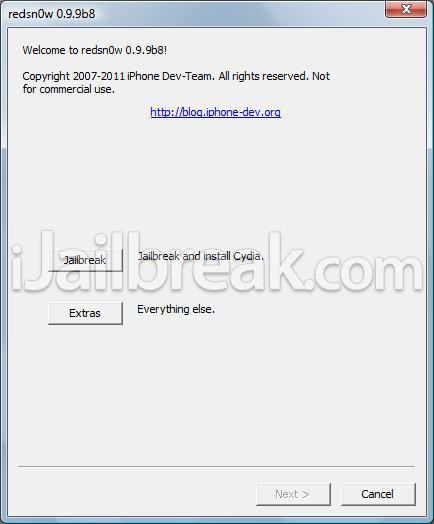
Step 3: With RedSn0w 0.9.9b8 up and running you will click the Extras button. You will now see a few buttons presented to you. The button you are interested in is the Select IPSW button. Click this now and select your devices corresponding iOS 5.0 firmware (not iOS 5.0.1).
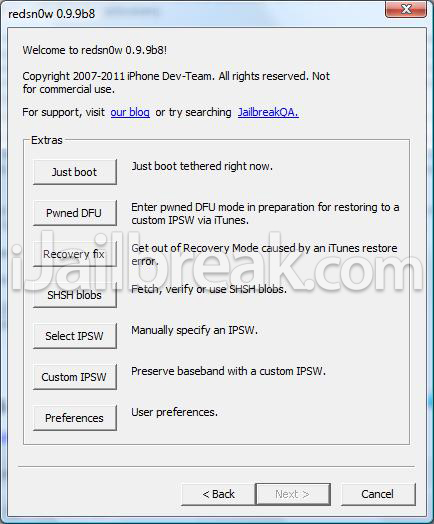
Step 4: Upon selecting the firmware click the back button, followed by the Jailbreak button.
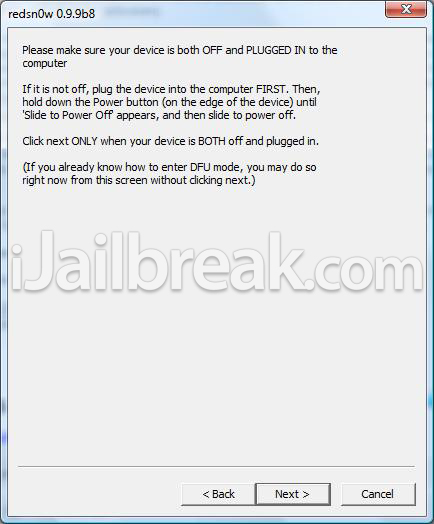
Step 5: After clicking the Jailbreak button ensure that the “Install Cydia” option is checked, click the Next button and you will come to a screen where you will need to put your iPhone into DFU mode. Read through and follow the instructions presented to you which is to plug in and power off your iPhone and click the next button.
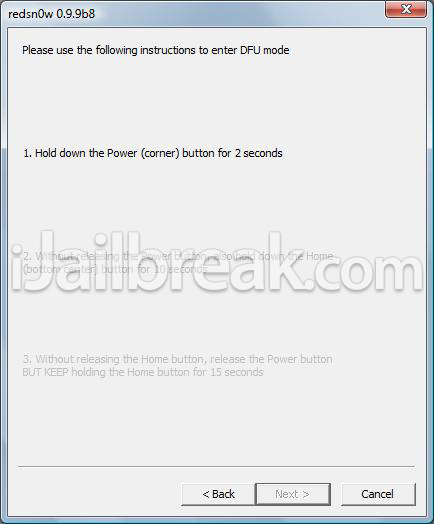
Step 6: When you click the next button you will need to follow the instructions presented to you to put your iPhone into DFU mode.
- Hold down Power (corner) button for 5 seconds.
- Without releasing the Power button, also hold down the Home (bottom center) button along with the Power button for 10 seconds.
- Without releasing the home button, stop holding down the power button for up to 15 seconds.
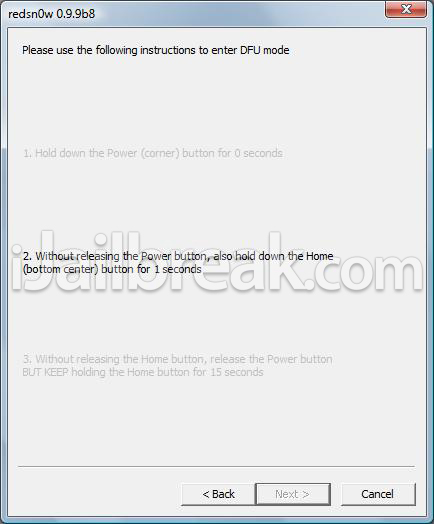
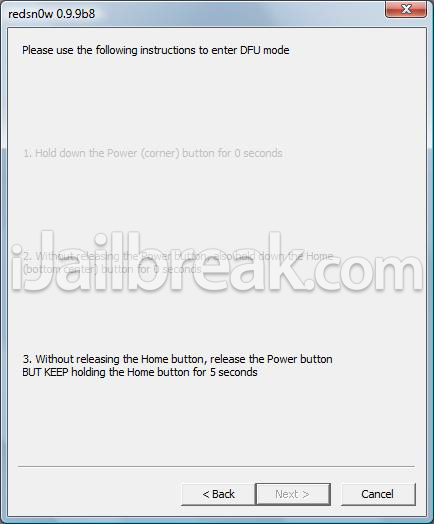
Step 7: After you successfully enter DFU mode RedSn0w will begin jailbreaking the iPhone. DO NOT interrupt or use the computer during this time. When the iPhone is finished being jailbroken it will reboot into a jailbroken state.
Optional: Booting Tethered – When you Jailbreak the iPhone running the iOS 5.0.1 firmware you will have a tethered Jailbreak. Meaning in order for the iPhone to turn back on you will need to boot it using RedSn0w (this applies every time the iPhone loses power). To do this launch RedSn0w again and click the Extras Button > then click the Just boot button and you will simply need to put the iPhone into DFU mode again.
Note: Yes, you need to do this every time the iPhone loses power.
Optional: SemiTethered Jailbreak – Though you have now Jailbroken your iPhone tethered on the iOS 5.0.1 firmware, you can actually SemiTether your iPhone. SemiTethering your iPhone basically means that you will be able to still use it if it ever loses power (with limited functionality). In order to SemiTether your iPhone you will need to add the following repository through Cydia:
http://thebigboss.org/semitether
Then search for the SemiTether Cydia package, install it and reboot your iPhone (yes, you will need to boot tethered again).
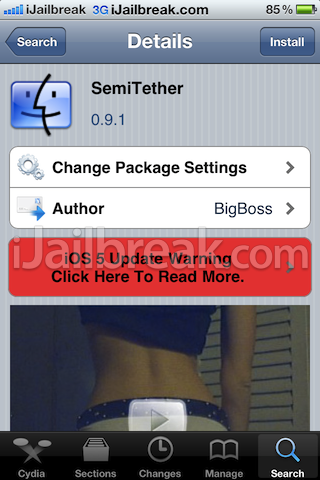
Done! You know should have a jailbroken iPhone on iOS 5.0.1.
if I’m on 4.3.3, and right now 5.0.1 is out… is there a way or is going to be a way, to upgrade to 5.0?????????????
look on the internet for the ios 5.0 ipsw and just use that to update
i all ready have the 5.0 ipsw, but as far as i know, apple isn’t signing 5.0 , just 5.0.1…. making it impossible just with iTunes…. because i don’t have the shsh of the 5.0…. but I’m not sure…. em i wrong??….
my iphone 4 is 5.0.1(9A405) baseband 04.11.08 , i would like to know if anybody has done this jailbreak because it is the first time i try this please tell me if it works just bought it ?
i just tried to update with a custom IPSW 5.0 and iTunes stopped with a window error saying the my iPhone wasn’t eligible…. i tried with tinyumbrella but also didn’t work… is there a work around?…
I’m getting unrecognized build / fingerprint on mine after following the instructions. I had upgraded to 5.0.1 through iTunes first. The instructions explicitly say to use the 5.0 ipsw, but it seems to be problems with recognizing the 5.0.1 ipsw that’s causing this. Anyone experience anything similar?
if u need the jailbreak then don’t update because there isn’t any untethered jailbreak.
there is only tethered or semi-tethered which for me it sucks
I’m running a 3gs 5.0.1, tried jailbreaking using the 5.0 firmware, everything went smooth until i got my phone back up and running. The Cydia icon was there but it was just a blank white icon and wouldn’t open when I tried opening it. Tried the “Just Boot” option and nothing changed… Any advice? Email me at Mcagan904@yahoo.com, I don’t check this too often.
this is what I am getting too. I restored since and now cant seem to get the damn things into DFU mode
yes the same is happening for me, when i select 5.0.1 ipsw in redsnow 0.9.9b8 it says, this redsnow is not supported for 5.0.1 firmware. Even am using the latest version
hey you are done …
Just Point Redsn0w to iOS 5.0 & then run the Just Boot option.
f you get this messege after you complete the Jailbreak you are done …
Just Point Redsn0w to iOS 5.0 & then run the Just Boot option. and wait until the iPhone turn on then you will get some setting , after that you will find Cydia
I have the iPhone 4 and tried the jailbreak on 5.0.1 and it was a disaster I just restored and am waiting for untethered.
You should be able to Jailbreak no problem on iOS 5.0.1, it is just a tethered Jailbreak.
i hv the same prblm plz can some one rply for us. :)
I had the same problem twice, but the third time it worked :)
i had the same exact problem, i did the same thing, at first i did it with the 5.0.1 and read you needed to do 5.0, so i downloaded the 5.0.1 first then the 5.0 and they happened to be in the same folder, once i moved the 5.0 ipsw into a different folder and selected it, it worked just fine.
Yep, same here now – third time worked. Only thing is now I have a “blank” Cydia icon (and Cydia isn’t working), but no biggie.
Thanks Fox. It didn’t seem to be working; I couldn’t aquire a GSM/3G signal and connect to the phone network, but after a few retries it worked. No idea what changed, though.
The “Just Boot” option gave me the unrecognized build/fingerprint message.
you have to close redsn0w, open it again, select the ipsw and after that you can majke the boot
Hi,
I did not understand step three (Select IPSW button. Click thisnow and select your devices corresponding iOS 5.0 firmware (not iOS 5.0.1)
It means while selecting custom IPSW select ios 5.0 firmware not ios 5.0.1.
Is this correct?
Thanks
i am confused also
Disaster
?? Why ?? I have the ios 5.0.1 too and i need to jailbreak my I Phone 4
therefore if there any problem just tell us, and
please confirm to us the restored process you did. Is it normal restore by using iTunes
and downloading the new and latest firmware from
apple??
Hi,
I am using iPhone 3GS and successfully upgraded to ios 5.0.1.
But not when I inserted sim Card it is showing No service.
Please help what did I make wrong.
Thanks,
Pramod
hi ya can you help i have no network after t jailbreak was hoping this would unlock phone to any network can you help
Hi,
Can anybody confirm whether redsnow will upgrade the baseband during the jailbreak? I rely on unlock, and I preserved the baseband when upgrading to snowbreeze custom 5.0.1 IPSW. I have my doubts because redsn0w uses stock 5.0 for the jailbreak.
Thanks.
I feeling a little retarded.. I clicked “Select IPSW” & I can’t figure out where in my computer to go, to find my ISO? It just brings up the option to select a document or program from my computer. help :/
uhhhhh, i jailbroke it and everything, BUT, i get no signal!! help please?:) shit is pissing me off. i got simple mobile, im at 5.0.1, and baseband, 6.15.00, and its an iphone 3gs, help ASAP por favor?!:D
I have the iPhone 4 version 5.0.1 and i tried this jailbreak like 3 times i followed the instructions and after it got into DFU mode it said something about unrecognized fingerprint , what do i need to do to make it work ? plz help me im not so good at all this hacking and stuff like that …
i have the same issue with 3gs, iso 5.1, it is jailbroken and ultrasn0w is installed . but there is no service. different sim cards are inserted but no lock
same problem here….
i jail broken my iphone 3gs iOs 5 with redsn0w_win_0.9.9b4, then i just boot tethered and everything was working fine until my iPhone loses power, Now i can not use Safari or Cydia, but the rest of the phone is working. i boot tethered in different times and still its the same scenario when ever my iphone loses power i can not use Safari or Cydia, any suggestion please!!
Jailbroken 3gs with redsnow win_0.9.9b4 and boot tethered, everything was fine until my iphone power down, and now Safari and Cydia not working, any suggestion which is not boot tethering anytime the iphone bettery is down. thnk you.
Did you ever get this resolved?
Worked fine for me on my newer boot rom 3GS – thanks for guide ;0) .. for those with cydia kinda blank icon after jailbreak, REMEMBER this is tethered, so you will need to follow instructions as above, use the “just boot” and follow to put in DFU mode again and boot up the jailbroken phone, Cydia will now be as it should be ;0)
After going through the process a few times Cydia does not install completely, I can see the icon (white) but nothing happens when I click it. Please help
same here! did you manage to fix it?
not yet, I am just trying to find a solution. I am going to try on another iphone to see the result!
working with baseband 4.11.8 pls Heeeeeeeeeeelp. im stuck. tell me soon as possible
I have had my phone without service for almost 2 weeks now and haven’t found anything to fix it.
I go to jailbreak and the screen turns white and it seems like it’s going right and then it randomly says no identifying data fetched and i need help with when you click extras then go to select IPSW i dont get what to select. Please help me ASAP i need to do this as fast as i can im begging someone to help me please!
For my Iphone 3GS- Ios 5.0.1 it worked— I did the following.
1) I downloaded RedSn0w 0.9.9b8, and ipsw 5.0 (Not 5.0.1 as mentioned on the tutorial)
2) I used that to jailbreak as the instructions have given above.
3) After when it was done jailbreaking, I still had some issues with the Cydia icon — It was blank.
4) So I selected the ipsw 5.0 again from the -SELECT IPSW- section , and clicked on the -Just Boot- Section.
5) Luckily, the Cydia icon came back, and it started working normally.
I think if you follow what I did, then you might actually get it to work.
I’m new for jailbreaking iPhone…..
if I have already have and iPhone 4 jailbreaked with XSIMM with iOS 4.1,
Can I Jailbreak it again with iOS 50.1 by using redSnow 0.9.9b8
and how can I get the same baseband as I use iOS 4.1
And u have signal? Dont u get No service error? Because that’s what i get and i did exactly as u did.
i cant get activated my iphone 3gs after ios 5.0.1 update and it gives this error in itunes: there is no sim card installed in the iphone you are trying to activate?
and the iphone is locked and i tried this tutorial with ios 5.0 it dosent work for me any help please??
i did like the other guy up there, with 5.0 and boot it again with 5.0 and the icon shows up and no bad serice
hi i have jailbroken my iphone version 5.0.1 by ispw 5.0 through redsnow it just jail broken n when its done my phine is showing the itunes written on screen along with the usb cable. n it even not geting restore i hv tried alot with all thhe possible ways but its not working plz help me wht to do now….???
I’m super confused is this at all possible with an iphone 4 baseband 04.11.08, IOS 5.01?
If it is and I’m not doing this for no reason, I’m stuck at Step 3, after selecting “Select IPSW button” I do not know where to go from there it says to select your devices corresponding iOS 5.0 firmware (not iOS 5.0.1), where is that, what is it, can I download it, did I download it. Ugh I’m lost after this step it looks like it’ll be a piece of cake. I’ve never worked with IPSW before I thought this would be easier because I have some back ground in jail breaking 4.2.1 but it’s sooooo different. Help me please!!!!! It’ll be greatly appreciated. =]
so you have ios 5.0.1 and it worked? how did you get the ipsw 5.0?
The same story….help
Guys it worked- I have updated to iOS 5.01 officially and for Jailbreak I used Redsn0w redsn0w_win_0.9.9b6 and iOS 5.0 to put cydia and it worked!
My iPhone- iPhone 3GS (Old Bootrom)
Baseband 06.15.00
iOS – 5.01
I’ve got a jailbroken Iphone 4 (ios 5.0.1 ipsw)
When the redsnow 0.9.9b8 jailbreaked my iphone… Something went wrong…
I’d try to load some apps back to my phone but It didn’t work!! Pop up: sync failed.
I can use the cydia and the installous too, but I can not restore my Iphone..
I’VE TRIED TO SHIFT RESTORE AND BROWSE the 5.0.1 ipsw, but it poped up: “cannot restore try it later”
U need to update ur basebandto ipad baseband then it will work to any network with ultrasn0w
I went exactly as per the the tutorial and I just successfully jb my iPhone 3GS 5.0.1 new boot room. Just remember to install the semitether before the first reboot, it really easy life.
To recap
1) I did a normal 5.0.1 update from 4.2.1 (I had a factory unlock phone) using iTunes on Windows 7 64-bit version.
2) Waited for normal restore and tested if everything was ok.
3) Proceeded with jb using redsn0w 0-9-9b8 while pointing to a 5.0 firmware for the tethered jailbreak and reboots etc.
Thanks for the tutorial.
No, I did not get any of those errors after doing that method. I don’t know why you are getting. Try to do it over again.
go to iclarified to download ios5.0
repeat the process, trick the installation by clicking ipsw (5.0) then click ” just boot” after that cydia will be activated
i’ve followed all the above intrusctions but in the end my phone shows no service / no sim …. can anyone tell how i can fix this issue …. reply ASAP
Good stuff boosxXxDude!! had some trouble but figured it out from you.. thanks bro
I have a problem that says IPSW is not supported by redsnow. I am using the IPSW for iOS 5.0.1 and redsnow 0.9.9b8
U r genius!!!!
hey guys can anyone help me,,,m stuck,,i have iphone 4 ios 5.0.1,,i am tryin to jailbreak it coz its not activating without its original sim,,n i dont hav tht orignal sim,,,i tried the same way but my phone is not turning on,,,redsnow said its done,,n evn iphone jailbreaking was going well but whn it showns apple sign,,it nvr goes or if it goes it shows wait sign,,,dont knw wht to do,,can anyone help plz,,,,urgent,,,
is that ur iphone 3gs work properly or shwng any prblm regrdng battery life or hanging or slowdown
Dude.! I’m Unable To Understand The Optional: Booting Tethered …!! This Step.! Please Help Me.! Thank You.:)
This worked for me, except when i restarted, it never finished restarting. It’s been stuck with the apple icon for 30 minutes. any ideas??
yaa it works
Mine did the exact same thing and I have a 3GS, so I went to Cydia and installed ultrasn0w. After doing that the phone blacked out and came back on, only to show it searching. So while doing that I went to redsn0w again and kept trying to put the phone in DFU mode but kept getting stuck in reboot mode and after trying again to put it in DFU, I just turned on the phone and my sim card worked. So I don’t know exactly what I did, but something worked.
As posted below:
Mine did the exact same thing and I have a 3GS, so I went to Cydia and
installed ultrasn0w. After doing that the phone blacked out and came
back on, only to show it searching. So while doing that I went to
redsn0w again and kept trying to put the phone in DFU mode but kept
getting stuck in reboot mode and after trying again to put it in DFU, I
just turned on the phone and my sim card worked. So I don’t know exactly
what I did, but something worked.
hi frmds…i have iphone 4-ios 5.0.1 and already jailbroken…..but i want to install siri…..
plz help me how i install it…
does this work for iPhone 3G? I see reference only as far back as 3Gs.
When I try Jailbreaking my phone it won’t work it just gets to the waiting for reboot part and then my phone turns back on and my friend said it shouldn’t be doing that :/ anyone have any ideas about what the problem could be? the phone is an iPhone 4 with the iOs 5.0.1
i need help idk what to use for my iphone 4 from Verizon running on 5.0.1 please help yes i got PC mean windows what should i use ???:(
every think is okay but ma 3gs cant show the signal its still searching
After i hit the Jailbreak button and it gets to the part where you are supposed to start holding down the sleep button for five seconds my RedSn0w doesn’t even let me push the button before the whole thing just shuts itself down. Does Anyone know what might be wrong with it or how I can fix it and go through with the Jailbreaking process?
by the step just boot it shows me no indetifiying fetched. what shoud i do??