Earlier today we told you that the Dev-Team have updated RedSn0w to version 0.9.9b6. RedSn0w was updated to version 0.9.9b6 to fix various bugs when jailbreaking iOS 5. While a majority of these bugs were mostly specific to users jailbreaking their iPhone 3GS (running the 06.15.00 baseband), the Dev-Team notes RedSn0w 0.9.9b6 provides both functional and cosmetic fixes for jailbreaking the iOS 5 firmware.
Note #1: We recommend jailbreaking iOS 5 with RedSn0w 0.9.9b6 even if you are already jailbroken on iOS 5. If you are going to re-jailbreak your iPhone 4 or iPhone 3GS with RedSn0w 0.9.9b6, just ensure you uncheck the install Cydia option.
Note #2: RedSn0w 0.9.9b6 does not allow you to create custom IPSW files for preserving your baseband. This feature is coming soon.
Note #3: RedSn0w 0.9.9b6 is a tethered jailbreak and does not support jailbreaking the iPhone 4S.
Note# 4: If you would like to update to iOS 5 please click here to follow our detailed guide.
Jailbreak iOS 5 On iPhone With RedSn0w 0.9.9b6
Step 1) Download RedSn0w 0.9.9b6 for Windows from the iJailbreak Downloads Section or using the download mirror below:
Mirror #1: RedSn0w 0.9.9b6 (Windows)
Step 2) Once you have downloaded RedSn0w to your desktop you will need to launch it by clicking the executable file.

Step 3) With RedSn0w up and running you will then click the Jailbreak button.
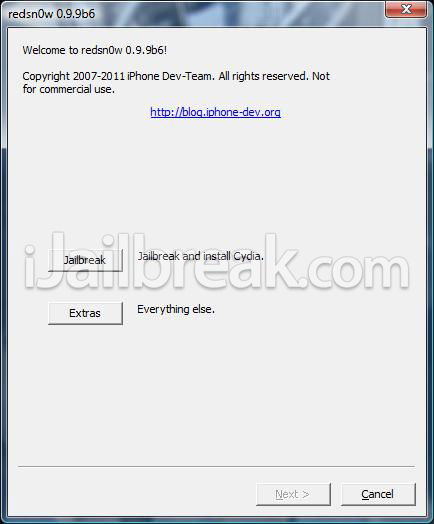
Step 4) You will come to a screen where you will need to put your iPhone into DFU mode. Read through and follow the instructions presented to you which is to plug in and power off your iPhone and click the Next button.
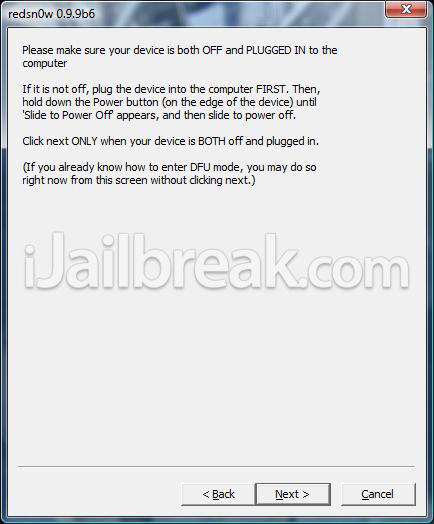
Step 5) When you click the Next button you will need to follow the instructions presented to you to put your iPhone into DFU mode.
- Hold down Power (corner) button for 5 seconds.
- Without releasing the Power button, also hold down the Home (bottom center) button along with the Power button for 10 seconds.
- Without releasing the home button, stop holding down the power button for up to 15 seconds.
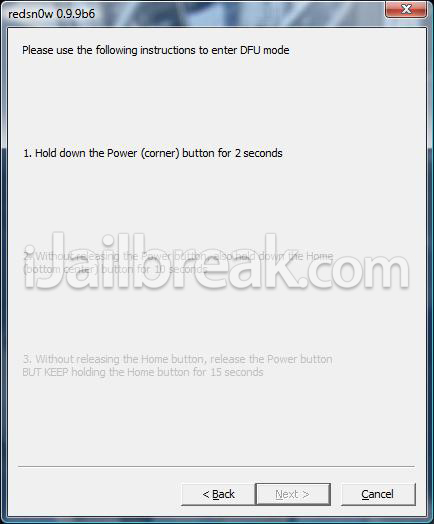
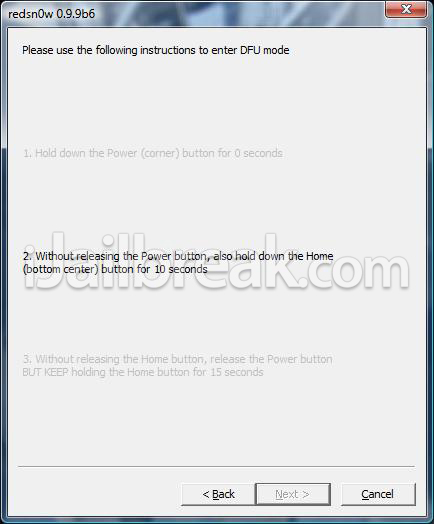
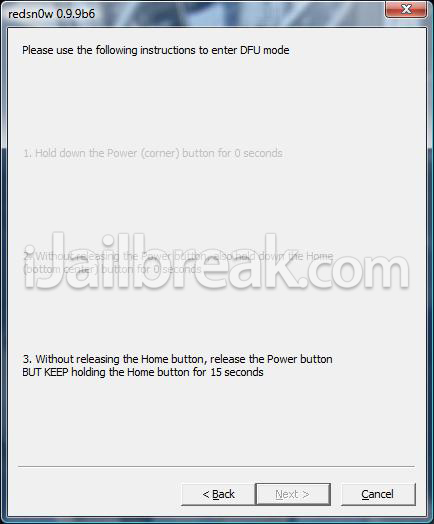
Step 6) After you successfully enter DFU mode RedSn0w will now prepare the jailbreak data. Once RedSn0w is done ensure the “Install Cydia” option is checked and click the Next button.
Step 7) RedSn0w will begin jailbreaking your iPhone. DO NOT interrupt or use your Mac during this time. When your iPhone is finished being jailbroken it will reboot into a jailbroken state.
Optional: Booting Tethered – When you Jailbreak your iPhone on iOS 5 (official version) you will have a tethered Jailbreak. Meaning in order for your iPhone to turn back on you will need to boot it using RedSn0w (this applies every time your iPhone looses power). To do this launch RedSn0w again and click the Extras Button > then click the Just boot button and you will need to put your iPhone into DFU mode again.
You can also follow our how to guide to booting a tethered jailbreak using RedSn0w on Windows by clicking here.
Note: Yes, you need to do this every time your iPhone looses power.
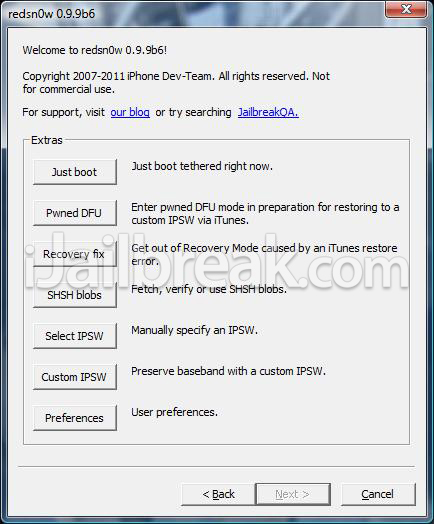
Congrats! You should now have a jailbroken iPhone 4, 3GS on iOS 5 using RedSn0w 0.9.9b6 (for Windows). Visit the How To Jailbreak Section for more how to’s from iJailbreak.com.
my home button is not working, so is there any other way to go in DFU mode without presing anything…thank you.
when will the untethered jailbreak comes to the light
after i jailbreak but i cannot install my cydia ? help !
anyone?
shhhhh.i have a lock iphone and i want to preserving my baseband,release a full jailbreak pleaaassse !
I successfully did the jailbreak in iphone 4. After jailbreak, the cydia icon appears white in color and non-responsive. You have to power off the device and reboot using redsn0w (extras-just boot). After this cydia works normally.
Next time you write a ” How To ” Explain in the title if it’s a Tethered Jailbreak, or an Unthethered, and try not to leave it to the last sentence.
Is it still needed to make custom IPSW to preserve baseband on 0.9.9b6? I have
06.15.00 BB (3GS) and I dont know what to do. Please answer somebody!
*loses
EXPLOIT FAILED
>:(
Thank you very much for your reply, I was wondering why cydia wasn’t working right :P You sir, are a scholar and a gent
Tethered Jailbreak!
Yes custom IPSW is needed. And redsn0w doesn’t preserve baseband. Go for sn0wbreeze in case you want to preserve it. Also, If your 3GS has old bootrom, the JB is untethered.
This Jailbre4k won’t work on my Mac, keep getting exploit failed like many people probably because it’s a non-properly formatted jb they thought it would with the final iOS 5 not the b3tas. Dammit.
Also genuine Apple USB Cablel, brand new week old iPhone 3GS brought from Apple store fycked up accidentally by failed jb and had to restore to 5.0 in DFU because it kept going in recovery made tried several different jb’s they all never worked except redsn0w at the time now that doesn’t even work FUCK YOU Apple!
contact me at this e-mail : shukairy-man@hotmail.com
i will tell you what to do
Worked great for me on my iPhone 4 ios5, I bought mine from Sprint during the preorder and iPhone 4 and 4S shipped with ios5 already installed. FYI my spouse purchased iPhone 4S while i bought the 4, putting both ours to the tests the 4 is much more stable after a jailbreak than a 4S. Same experience with other friends who bought 4S, iPhone 4 ios5 is totally stable after a jailbreak. Enjoy!
didnt work for me.. ): and i agree mention the tethered near the top, i was almost pissed, until it didnt work.
Worked, the mistake is people don’t realize after you have cydia installed with the white icon you need to run redsn0w again then click extras –> just boot then you get it! :) reboot after installing changes take a while though :/
plz help do u hv to put a key sim to the sim card tray or jst sim tray comes wit iphone 4. plz reply me soon. thnx :)
i get an SHSH error…. what do i have to do?
its this working wit firmware 4.11.08 ? if so i should use a key sim or not. plz reply soon. i stuck in my iphone 4. i updated it to ios 5. nw my sim is nt readying :(
why is it so special with 3gs? what’s with the bootrom that enables it to jailbreak unthethrered???
Working
Hold the power button and menu button till the iTunes option flashes up,then connect your device to iTunes and restore your device.
your are right..But only problem with theater ed jail break is every time you need to reboot it with red snow.So please wait until untethered jail break is launched.
So is this jailbreak stable? I rememer when they first came out it was supposedly designed or developers since there were still a lot of bugs, but im already sick of not being jailbroken, so if this is actually usable i dont mind it being tethered. And also, if this version is stable and i decide to go through with it, when an untethered version comes out will i have to restore my device (iphone 4 if anyones wondering) or can i just untethered jailbreak over it? Thanks everybody
This will not kick my phone out of recovery mode!!
How would you know if no jailbreak has been tried out on the 4S?
so you can’t turn your phone back on without redsnow? am i reading that correctly?
Anyone else get a “This device is already pwned with a bootrom exploit” error?
i have iphone 3gs i have upgraded it o ios5 and jailbroke with redsnow 9.9.0b6 after jailbreaking i am not getting my cellular network pl s help
I’ve complete my jb but i was unable to install appsync 5.0+ in cydia… after i done install i was told to REBOOTS DEVICE…after tap on it will keep showing the apple logo…i already did a boot tethered also but same thing happening…HELP…T.T
You can turn your phone back on, the JB just wont work. Turn your phone back on using the “Boot Tethered” option in the extras section in redsn0w
Should this work with a brand new WHITE iPod Touch (…the one that recently has been released) which comes standard with iOS 5.0?
I’d really would love to jailbreak it but because I recently bought it and the warranty will be void, i thought i’ll ask this to be sure that i’m doing the right thing ;) Ty in advance!
I’m trying to JB and I’m stuck on the screen that says ‘Identifying…’ How long do I have to wait for this step to finish?
Erm mind me how abt iPhone 3G ? Does it works?
I did the boot through redsn0w but still the Cydia is in white.
One more problem: the mail and Safari are not opening; actualy opening then closing immediately.
This happened as well with my ipad 1ST GENERATION.
Just an update: after making this reboot several times the cydia, mail and the safari are working fine.
where is my ipsw files at??
You need to download ultrasnow from cydia to unlock your iphone
cydia is blank what do i do
Sir
i follow all of your instruction, all was fine. but now when i install cydia no signal for my carrier. please help
thanks
i already jail break ios5 using redsonw9.9b7 this is ok
hey m having problem while restarting my iphone 4…..i cannot restart it i hav to do it using redsnow only….can u tel me wats the problem ????
I have iPhone 4 with iOS 5 and baseband preserved at 1.59.00.
Will Jail breaking using this method still preserve the baseband so i can then unlock my phone using Ultrasn0w ??
So . . . does this work for an iPhone 4S?
Hey. I have an iPhone 3GS, new bootrom, tethered 4.2.1 jailbreak on 06.15.00. This guide will work on Windows for jailbreaking to iOS 5, correct? Because I know I can unlock it on cydia using Ultrasn0w from there.
i just have just jailbroken my iphone 4 with iOS 5.0. did all steps told and redsn0w sais it is done though the cydia icon on my springboard is white and it cannot launch (immediately crashes). what is the problem? oh and it is not really jailbroken as i can reboot it without any problems
hmm rebooting worked but then cydia didn’t work as i mentioned. though as experiment if it would work i started it with the boot tethered option on redsn0w and now cydia does work. as if it was a semitethered jailbreak though i had not downloaded anything from cydia because that didn’t work. weird… though everything works for now
Good to hear that it worked. You post also helps people who may face similar issue. I have to jailbreak my iPhone 4 which has iOS5 and glad it worked fine. I will be also doing this later on. Good luck.
Hey!! Thanks!! It worked for my iPhone but why does Cydia always want me to reboot device??
Restore your phone than jailbreak it again??
yes, any solution?
i did all this but after jailbreak still it says insert a valid SIM with no PIN lock to activate iphone & sometimes it stuck at apple logo.
i tried this 10 times
help pls
Stuck at apple logo while rebooting after jailbreak
what to do ??
help pls
Hi Joy_19, jailbreaking is NOT equal to unlocking yyour phones, this tutorial is for jailbreaking, your phone is still locked to whatever service provider you had before. This is assuming your phone was locked even before jailbreaking.
Please tel what is your phone’s baseband ?? Go to settings -> about -> modem firmware
This will hep us in telling how to unlock your phone.
But mostly it will be using Gevey SIM if you DID NOT preserve the baseband (1.59.00).
Do this…
1. Turn off phone
2. Connect to PC with which you jailbroke your phone.
3. Open Redsn0w -> Extras -> JUST BOOT
4. Follow on screen instructions to boot your phone.
This has to be done EVERYTIME your phone loses power and you need to reboot it. This is called a TETHERED jailbreak and you HAVE to do this everytime your phone is booted again.
But search for semitethered jailbreak to ensure that you can boot into your phone without all this and still have the basic functionality usable.
can i call and text if i jail break an iphone 4, ios 5?
You can do that ONLY if you have a semitethered jailbreak. The above tutorial is for a tethered jailbreak. I would suggest you first JB using he above method and then search for the semitethered JB and use that and then you can boot your phone WITHOUT PC and use phone / text.
my phone app is blank !!!
Hello there everybody. I have a kinda big problem with my iDevice, i made a jailbreak which is tethered,on my iPhone 3GS,new bootrom,iPad baseband, 06.15.00. After jailbreak,everything works perfect, but i get No Service … I installed ultrasn0w,but still nothing … Can anybody help me please ? I don’t have no more ideas,what could be the problem … Greetings everyone, Hope that U can help me …
I have jailbroken my iphone 3gs, installed ios5 (apparently) done the ‘just boot’ through redsnow, ran through the setup fine, chose the backup from itunes option, started doing that, it said it was okay, now im stuck on a screen with the apple logo and a progress bar that is literally not moved in 30 mins? what should i do? This phone was originally locked to O2 but paid to get it unlocked so i could use my Three Sim in it, now i am back on o2 i just want to update to IOS 5!
I jailbroke my iphone 4 using redsnow 0.9.9b7……….after i jailbroke tried to install INSTALLOUS for installing cracked apps ….wen i rebooted my device …..im stuck at the apple logo for nearly 1 hour !!! …..pls pls pls hlp
i jailbroke my iphone 4 using redsnow 0.9.9b7……jailbreak was successful …den i installed INSTALLOUS to install cracked apps on my iphone ….den i rebooted my device and im stuck at the apple logo !!!!……………….Pls pls pls pls hlp hlp……..someone pls hlp me im in deep shit…..
Did you reboot your iPhone 4 normally or did you connect the iPhone 4 to PC and then used the JUST BOOT feature in Redsn0w and then boot the phone ?
Since you have jailbroken your phone, you CANNOT Boot normally since the JB is tethered which means everytime you have to start your phone, you need to connect it to PC and use redsn0w to boot (Start redsn0w -> extras -> just boot)
Report back here after doing this.
Jeez, I’ve been looking for this answer for HOURS. Thanks.
just jailbroke my iPhone 4 with reds0now. first i did a the process to preserve my baseband. then i went ahead and jail broke the phone but after it did everything, pawnage logo, apple logo it went straight to the apple loading ring and is stuck there. Does any body have an idea what to do.
PS my iPhone has been unlocked since last yr and i no longer have the carrier sim i’m sure if that played any roll in the problem.
WHY AFTER JAILBREAK MY CYDIA LOGO IS WHITE ONE…AND I CLICK IT AND CNT FUNCTION
after i jailbreak my iphone4. and i using that extra-justs boots for reboot my device… why the redsnow show me ‘no identifying date fetched”… what are this problem yah?
what the problem is no identifying date fetched…?
I’ve got the same problem!!! :'( pls somebody help!!!
dmn after all of that i complete the jailbreak and when i got and click on the cydia tab on my iphone…. it wont open?? can someone help me. do i need to delete and re-install??
need help please !!!!!I did the boot through redsn0w but still the Cydia is in white.
One more problem: the mail and Safari are not opening; actualy opening then closing immediately
what can i do? please help
i am having the very same problem. maybe we should just uninstall and use spirit tool if help is not available.
I kept trying to jailbreak, but it just kept saying unrecognized built ? What does it means??
I HAVE JAILBREAKED MY IPHONE 3GS but apps are not getting sync… plz help….send me your reply at gaggsdreamer@yahoo.com
do i have to use the reboat tool everytime i switch the phone off?? or is it just when it looses power??
its this working wit baseband 4.11.08 ? plz reply soon. i stuck in my iphone 4. i updated it to ios 5. nw my gevey sim is nt supporting :( should i hv to buy a new gevey sim? loads of people said gevey sim is nt out to baseban 4.118 is it true? when is it releasing ? rply soon plz plz
Everything is working fine after DFU mode and the next steps but after that, I get EXPOIT FAILED. What should I do???
Both of you use JUST BOOT feature of redsn0w to restart the phone. Also i suggest use the latest redsn0w 0.9.9b8 to jailbreak the iPhone. But that version does not matter. Just use JUST BOOT.
I jailbroke my iPhone 4 yesterday and i also got white cydia icon but then i restarted using JUST BOOT in redsn0w and then i got proper cydia icon and it is working as well.
Please read some of my replies below plzzzz
check below my reply
switch off is same as losing power so effectively you have to use the redsn0w to restart the phone everytime it is powered off / switched off / loses power.
redsn0w 9.9b7 on iphone 3gs with ios 5… 1) run redsn0w as XP admin and 2) check “install baseband” in addition to “install Cydia” … fixed my ‘No Network’ issue. Running with SIM in China
Yes u can download tinyumbrella and use that softwre to get ure idevice into DFU Mode!
I’m having the same problem
i have a iphone 3gs 5.0.1 and tried to jailbreak it there, but at the dfu mode and reboot, it comes up ‘Unreconized Build’ and doesn’t jailbreak it, any help?
i use it for my iphone 4s, but it warns that the device cannot be detected. after that i plug it off but cant turn the phone on … somebody pls help me. wat happend with it ?
reboot tether
when you boot it boot tether and everything will go to normal
boot tether cause ios 5 is a tether jail break not untethered i have i phone 4 with ios 5 and have to do the same thing if it loses power or you hit the power and home button at the same time.
using the gevey sim is illegal in some state’s that why not many people use it saurik redsnow is the best i’ve used the most never have a problem out it at all and i have a ios 5 i phone 4
working with baseband 4.11.8 Plzz help! im stuck! plz plz plz. somebody plz ! :'(
how can you write that you can jailbreak with redsnow for baseband 06.15 when it cant make custom ipsw !
what about i phone 3G?
can i jailbreak iphone 4S..???
ios 5.0.1…
what abt d 4s
i’ve done with the jailbreak.but there is no installous.how to get that?
My ipod4g Turns back on when is in the rebooting part!!!! ive tried many times and it keeps doing the same
It doesn’t work for me. When it says waiting for rebook the phone comes back on, and is not jail broken. Does anyone have a suggestion?
I want to, but Im scared it will stuff the whole ipod 4 gen.