In this section you will learn how to carrier unlock your iPhone running a variety of baseband (e.g. 01.59.00, 04.26.08, 05.11.07, 05.13.01, 05.12.01, 06.15.00) and firmware (e.g. iOS 9, iOS 8, iOS 7, iOS 6, iOS 5, iOS 4, iOS 3) combinations. Simply scroll through our how to unlock section for the iOS firmware you are trying to unlock, and follow one of our easy to follow how to guides using UltraSn0w, UltraSn0w Fixer and other unlocking solutions.
Note #1: Your iPhone needs to be jailbroken in order to unlock it by using UltraSn0w or UltraSn0w Fixer. Visit iJailbreak’s How To Jailbreak section for all your jailbreaking how to’s, tutorials and guides!
Note #2: We will be updating this page with the latest how to unlock guides when new baseband/firmware versions are released, so make sure you come back soon!
The Different Methods To Unlock An iPhone
Unlocking the iPhone is a process where the iPhone is modified to accept the SIM card of any carrier. Unlocking your iPhone is not the same thing as Jailbreaking your iPhone. When you Jailbreak your iPhone you are not unlocking it, rather opening it up to 3rd party tweaks and applications. For more information on Jailbreaking you can visit our Jailbreaking section. It is important to keep in mind however, that to software unlock your iPhone it is indeed required for it to be Jailbroken.
If you purchase an iPhone on a contract then it is locked to that carrier until your contract runs out. This is usually for a period of 2-3 years. When you purchase an unlocked iPhone, meaning you pay the full price for the iPhone, then it can be used with any carrier and there is no-commitments in the length you must stay with that particular carrier. What you should be taking away from this is that there is no real middle ground. You either have a locked iPhone or an unlocked iPhone. Thanks to some workarounds however, it is indeed possible to unlock a locked iPhone.
The first method to unlock an iPhone would be a hardware unlock (obviously out of scope for most people). At this time it is not possible to hardware unlock your iPhone. This entails actually modifying the internal components of your iPhone. When the original iPhone was released this was indeed possible, but long gone are those days.
The next method for unlocking your iPhone is a software unlock. The two software unlocking solutions for the iPhone that are currently available are UltraSn0w and BlackSn0w. UltraSn0w was developed by a group of developers by the name of the iPhone Dev-Team, where BlackSn0w was developed by an individual by the name of Geohot. The only problem with software unlocks are that they require a Jailbreak and are only supported on a limited number of older baseband versions.
Another method of unlocking an iPhone involves purchasing some sort of passthrough card or SIM interposer. When you purchase one of these special passthrough cards you will be required to place it between your SIM card and the baseband hardware (it essentially sits on top of your SIM card). In order to maintain this sort of unlock you must always keep the card between your SIM card and baseband hardware. This method of unlocking has become more popular because it supports newer baseband versions. Example’s of companies who create such passthrough cards include Apple N Berry and RSIM-7. The price of one of these cards is anywhere from $20 – $40.
The last method for unlocking your iPhone is an IMEI unlock. Although this method of unlocking the iPhone is more expensive than buying a passthrough card/SIM interposer (it will run you anywhere from $50 to $200), it is more convenient. When you IMEI unlock your iPhone it is unlocked for forever and you can update to new iOS versions, without worrying whether it will effect your unlock or not. IMEI stands for International Mobile Equipment Identity and it is a string of numbers which Apple uses to categorize iPhone’s as lock or unlocked. When you purchase an IMEI unlock for your iPhone it is placed into the latter category. There are many online services available for IMEI unlocking your iPhone, which you can find yourself.
Which iPhone Unlocking Method To Choose
Essentially you have three options when it comes to unlocking your iPhone.
- Software Unlock
- Passthrough Card/SIM Interposer
- IMEI Unlock
Software iPhone Unlock Compatibility
Unfortunately software iPhone unlocking solutions are no longer compatible with newer iPhone generations or baseband versions. If you happen to be in possession of an older iPhone with one of the compatible baseband versions shown below however, you can indeed unlock it for free. Keep in mind that if a new baseband exploit is found and one of these software iPhone unlocking solutions is updated we will update this list.
UltraSn0w Supported Baseband Versions
iPhone 6s Plus: Not Supported
iPhone 6s: Not Supported
iPhone 6 Plus: Not Supported
iPhone 6: Not Supported
iPhone 5s: Not Supported
iPhone 5c: Not Supported
iPhone 5: Not Supported
iPhone 4S: Not Supported
iPhone 4: 1.59.00 (GSM only)
iPhone 3GS: 4.26.08, 5.11.07, 5.12.01, 5.13.04, and 6.15.00 (special iPad baseband)
iPhone 3G: 4.26.08, 5.11.07, 5.12.01, 5.13.04, and 6.15.00 (special iPad baseband)
Repo: http://repo666.ultrasn0w.com/
BlackSn0w Supported Baseband Versions
iPhone 6s Plus: Not Supported
iPhone 6s: Not Supported
iPhone 6 Plus: Not Supported
iPhone 6: Not Supported
iPhone 5s: Not Supported
iPhone 5c: Not Supported
iPhone 5: Not Supported
iPhone 4S: Not Supported
iPhone 4: Not Supported
iPhone 3GS: 5.11.07
iPhone 3G: 5.11.07
Repo: http://blackra1n.com/
How To Software Unlock The iPhone
Unlocking your iPhone with UltraSn0w or BlackSn0w is extremely simple and only requires your iPhone to be Jailbroken. For those of you that do not know how to Jailbreak your iPhone you can visit the How To Jailbreak Section. We have detailed how to guides for unlocking almost all supported firmware and baseband combinations. You can browse through the tutorials listed below or if you are more technically inclined simply add the repository for one of the software unlocking solutions (shown in the compatibility section) and then install the package to your iPhone.

Unlock iOS 9, 9.0.1, 9.0.2, 9.1
Unlock iOS 8
Unlock iOS 7
Unlock iOS 6 / iOS 6.0.1 / iOS 6.1
- R-SIM7
- R-SIM7 Will Unlock iPhone 5 Or iPhone 4S On iOS 6.0 [No Jailbreak Required]
- GEVEY Ultra S
- ApplenBerry Release iOS 6 Compatible GEVEY Ultra S For GSM iPhone 4S
Unlock iOS 5.1.1
- UltraSn0w
Unlock iOS 5.0.1
- UltraSn0w
- GEVEY Ultra S
Unlock iOS 5
- UltraSn0w
- How To Unlock iPhone 4 (01.59.00) On iOS 5 Using UltraSn0w 1.2.4
- How To Unlock iPhone 3GS (04.26.08 – 06.15.00) On iOS 5 Using UltraSn0w 1.2.4
- How To Update To iOS 5 Firmware Without Updating Baseband [iPhone Unlockers]
- How To Unlock iPhone 4 With Gevey SIM Card On iOS 5 Firmware
- How To Reflash 06.15.00 Baseband With RedSn0w 0.9.9b6
- How To Preserve iPhone 4, iPhone 3GS Baseband On iOS 5 With Sn0wBreeze [Windows]
Unlock iOS 4.3.3, 4.3.2, 4.3.1, 4.1
Unlock iOS 4.2.1
Unlock iOS 4.1
Unlock iOS 4 / 4.0.1 / 4.0.2
Other Unlocking Solutions
- Unlock AT&T’s Full Price iPhone 5… Restore It On iTunes
- ApplenBerry Is Offering To IMEI Unlock Your AT&T iPhone 5 For Only $44.99
- Will Strafach (@Chronic) Now Offering Factory iPhone Unlocks For US, UK, And Canadian Carriers
- AppleNBerry Releases IMEI Unlock To Permanently Unlock Your AT&T iPhone… For A Price
- Telus Now Offering iPhone Unlocking With A $50 Fee
- GEVEY Ultra S GSM iPhone 4S Users Keep Their Unlocks In iOS 5.1.1
- GEVEY Ultra 5.1 Unlocks The GSM iPhone 4: Too Little, Too Late
- Here Is How I Unlocked My iPhone On iOS 5.1 (Using SAM) Without It Being Jailbroken
- How To Officially Unlock Your AT&T iPhone And Maintain Your Untethered Jailbreak
- How To Unlock Your Out Of Contract iPhone For Free Using AT&T’s Online Chat
- AT&T Will Unlock Your iPhone Starting This Sunday Due To Complaints
- CutYourSIM IMEI Factory Unlocking iPhone Service Returns [Unlock Now]
- New SIM Interposer TPSIM Claims To Unlock A Variety Of Basebands For iPhone 4S / iPhone 4
- How To Unlock GSM iPhone 4S With An iOS 5 Bug [No Jailbreak/Extra Hardware Required]
How To Fix T-Mobile US iOS 4 MMS Problem On iPhone 4
Step 1: Launch Cydia.
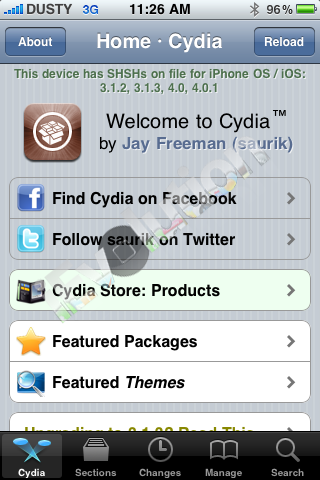
Step 2: Tap the “Manage” tab located on the bottom tab bar.
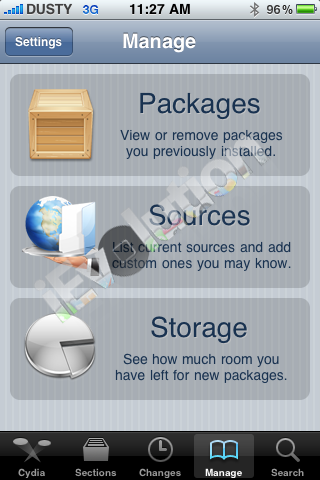
Step 3: Tap “Sources”, “Edit”, then “Add”. You’ll be prompted to add URL source. Type “http://cydia.pushfix.info” and tap “Add Source”.
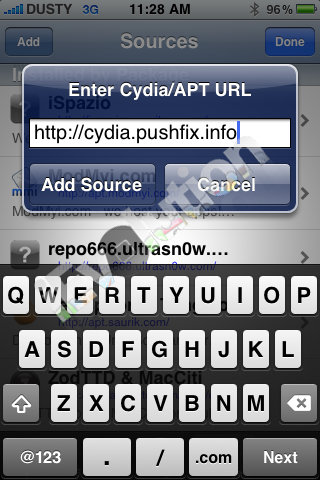
Step 4: Cydia automatically refreshes and updates sources.
Step 5: After Cydia is done refreshing sources. Tap the “Search” tab on the bottom tab bar and search for “T-Mobile US MMS Fix for iOS4”. Once “T-Mobile US MMS Fix for iOS4” appears, tap and you should see version “1.0″. Tap “Install”.
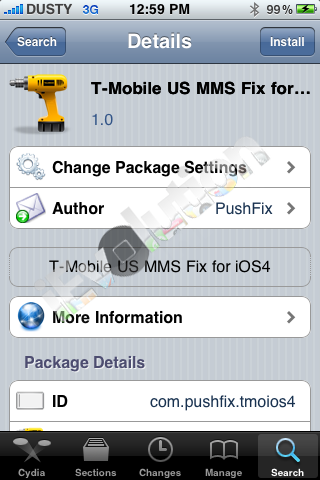
Step 6: Navigate to Settings > General > Network > Cellular Data Network and enter the following settings for MMS:
APN: wap.voicestream.com
MMSC:
MMS Proxy: 216.155.165.50:8080
MMS Max Message Size: 1048576
MMS UA Prof URL: http://www.apple.com/mms/uaprof.rdf
Step 7: Reboot your iPhone.
Volia! MMS should now be working.
how to unlock my iphone2?
Nice sharing
theres no such thing as iphone 2 ! its called the original iPhone !
My iphone5c has been jail broken I’m not sure where to go from here help????
Hiya need help iv got a iphine 4 and need it iunlocked and its jailbroken ?? Helpp pleasee
pleas any solution on how to unlock icloud on ipad 234
I have recieved an iphone 4s from a friend in US but it is locked with an itune inscription on it.How can i go about it?
nice
How do I unlock or re-program my iphone 5c to use with an alternative carrier?
I am a CDMA customer in American Samoa.
i have received iphone6 from my friend which is UK Vodafone carrier locked. All punters in india have given up in unlocking it. U have any solution…can u accept a challenge???.
Hello please could you help me I live in South Africa andI have a network carrier locked iPhone 3GS from T&T mobile. They won’t unblock it as its been out of use for than 6months. Could you help me or guide me in what I can do. I would like to give the phone to my little brother. Thank you in advance
Hello so I just paid to get his iPhone screen fixed and forgot the password because it’s been so long. I don’t want to factory reset it and lose all of my information. Is there any way you can help?
An alternative way to unlock iPhone/iPad/iPod touch without a passcode is to use TunesKit iPhone Unlocker.