ColoredKnob: Change The Color Of Slide To Unlock Knob
Want to change the color of the Slide to Unlock knob on your iPhone, iPad, iPod Touch? Worry not, there’s a tweak for that! The original Slide to Unlock knob is grey in color and very dull and uncool. If you wanted to change its color to say, Green or Red, then you would definitely want to install this jailbreak tweak.
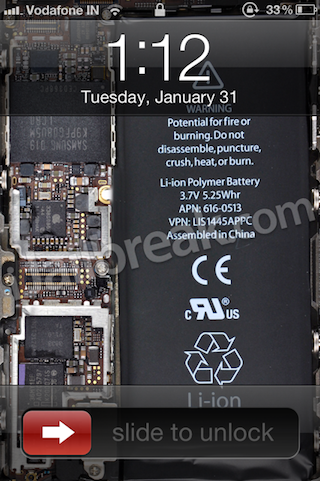
ColoredKnob is a new Cydia tweak, which does nothing more than change the color of the Slide to Unlock knob. That’s it, as simple as that. However, that simple change makes a lot of difference in appearance. But, there is a slight problem with this tweak. Well, it’s not as much a problem than lack of more colors to be honest. The tweak only lets you choose either Red or Green, no other color for now, which in my opinion is bad.
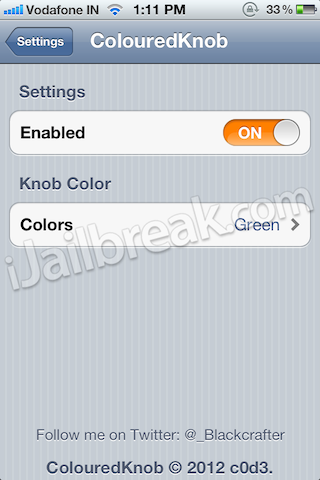
Hopefully, the developer reads this and adds some more awesome colors to it. Such as a transparent one, a mix of 2 or 3 colors and things like that. If you’re in the mood to try out this tweak, launch Cydia on your jailbroken iOS device and look for ColoredKnob in the BigBoss repo. It’s available for free.
What more colors would you have liked? Let us know in the comments…
Update #1: ColoredKnob Now Features 10 Colored Slide-To-Unlock Buttons
Fairly recently we told you about a jailbreak tweak called ColoredKnob that could change the color of the Slide-To-Unlock button on your lockscreen. When we initially reported this tweak the color options were limited to only Red and Green. Today, however, the tweak has been updated to include a bunch on new colors such as Blue, Purple, Yellow and Black.
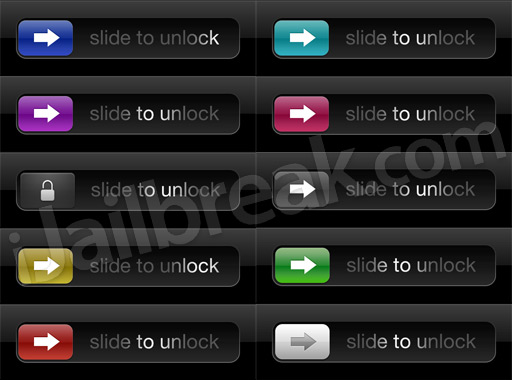
The only thing I disliked about the tweak when it was first released was its lack of colors, now however, with 10 colors to choose from I think it is safe to say the developer has fixed this issue. Thus, I highly recommend this Cydia tweak to all who would like a subtle way to make their iPhone, iPod Touch or iPad stand out from the crowd.
MissionControl: Add Quick Shortcuts Menu Via Activator
The MissionControl Cydia tweak will give you quick access to numerous frequently used functions on your iOS device such as sending a new SMS, email, launching the Facebook app and much much more. MissionControl tries to copy the Mission Control functionality present on the Mac OS X Lion operating system, but has a ways to go if this tweak hopes to compete with such a robust functionality. This is not to say, however, than MissionControl is a poorly designed tweak. If you are looking for quick access to commonly used system functions then the tweak will be perfect for you. I personally wish this tweak could of incorporated configurable shortcuts, but maybe this will come in the future.
Note: Activator must be installed prior to installing MissionControl and an action must specified to activate this tweak.
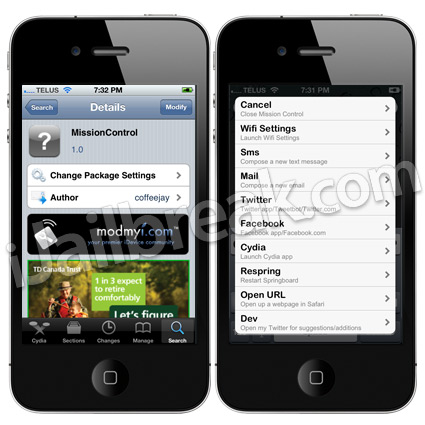 If you are interested in the tweak you can find it in Cydia through the ModMyi repo for free.
CamSlideShow: Add A Camera Button To Your iPad 2’s Lockscreen
When Apple released the iOS 5 firmware for the iPhone, iPod Touch and iPad most of the features were pretty consistent throughout all of the iOS devices. One feature that was present on the iPhone and iPod Touch, however, that did not make its way to the iPad 2 was the quick camera lunch button that appears on the lockscreen when you double tap the home button.
If you wished you could add a camera button to your iPad 2’s lockscreen, then you may want to checkout the CamSlideShow Cydia tweak. This tweak will turn the default slideshow button that appears on the iPad 2’s lockscreen (when double tapping the home button) and make it launch the Camera.app instead. Unfortunately this tweak does not change the icons image, but don’t be deceived, once installed it will redirect to the Camera.app.

If you are interested in the tweak you can find it in Cydia through the BigBoss repo for free.
TelOnNotification: Make Calls From Notification Centre (Written By Jay)
TelOnNotification is a neat Cydia tweak for your iPhone! TelOnNotification basically allows you to ring phone numbers straight from your Notification Center, as a little widget. You’ll be able to call 5 numbers from your iPhone’s Notification Center without having to open the phonebook app. This is a really simple to use, convenient little tweak that packs a lot of functionality.
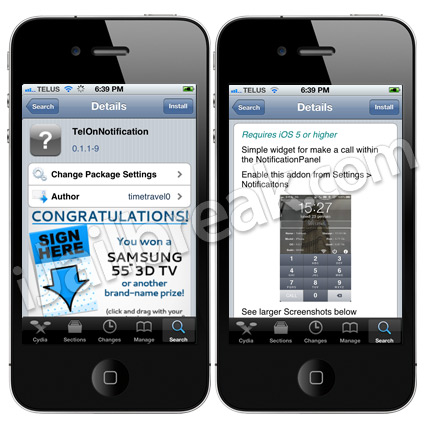 You can find TelOnNotification in the BigBoss repo for free.
It has been updated to add more colours a random effect and a long slider